We remain fully operational. Our teams are working around the clock to ensure your deliveries continue safely.

Descargar la aplicación


Servicios al cliente
Sobre nosotros
Copyright © 2025 Desertcart Holdings Limited
Descargar la aplicación

Buy anything from 5,000+ international stores. One checkout price. No surprise fees. Join 2M+ shoppers on Desertcart.
Desertcart purchases this item on your behalf and handles shipping, customs, and support to Peru.
🚀 Elevate your smart home game with ultra-long range Z-Wave power!
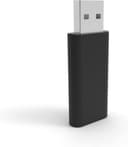
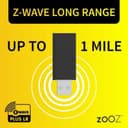
The Zooz 800 Series Z-Wave Long Range USB Stick (ZST39 LR) is a professional-grade smart home controller that extends Z-Wave network coverage up to one mile. Designed for advanced users, it offers plug-and-play USB 3.0 compatibility across major OS platforms and supports OTA firmware updates. Perfect for DIY enthusiasts using Home Assistant or HomeSeer, this compact device ensures reliable, low-latency connections for extensive smart home setups.
| ASIN | B0BW171KP3 |
| Best Sellers Rank | #134 in USB Flash Drives |
| Brand | ZOOZ |
| Built-In Media | 800 Series Z-Wave Stick |
| Color | Black |
| Compatible Devices | Desktop, Laptop |
| Compatible Operating System Family | Linux, Windows |
| Customer Reviews | 4.7 4.7 out of 5 stars (552) |
| Data Link Protocol | USB |
| Hardware Interface | USB 3.0 |
| Item Weight | 0.02 Kilograms |
| Manufacturer | Zooz |
| Mfr Part Number | ZST39 |
| Minimum Required Operating System Version | Mac OS 10.15 Catalina, Mac OS 11 Big Sur, Mac OS 12 Monterey, Ubuntu 20.04 Focal Fossa, Ubuntu 22.04 Jammy Jellyfish, Windows 10, Windows 11 |
| Model Number | ZST39 |
| Smart Home Compatibility | Smart Home Compatible |
| UPC | 853478006391 |
| Unit Count | 1.0 Count |
| Warranty Description | 1 year manufacturer warranty |
M**H
Plug and Play
I plugged this straight into my Mac Mini and it was recognized instantly without driver, just pure plug-and-play. Home Assistant (Virtualbox) picked it up via Z-Wave JS without a hitch. My house is two stories with a decent-sized backyard, and this single stick handles everything. Even my furthest outdoor sensors stay connected with zero latency.
N**.
Need Z-Wave? This is your new antenna
I've recently decided to smarten up my dumb home. In my research it appears that Z-Wave is more secure for security related devices when running my Home Assistant. So I purchased this antenna to help connect my security based devices. The antenna was very easy to setup. The range and power are fantastic. It's far superior to my zigbee range, and the signal is very stable. The connection and setup were both very easy as well. However, the amount of end points I can attach is a little lacking so I am using both protocols.
A**R
Works for smart hub.
Connects my smart home just fine. Small profile. Quick. Easy install and connection to proxmox and Home Assistant on a beelink miniPC.
J**E
Love zooz!
I can't say enough good stuff about zooz. All of their products have worked great with my Home Assistant zwave setup
C**K
Z-Wave Home
Easy to setup with Home Assistant. I started with the 'Z-Wave JS UI' instead and added the 'Z-Wave' official plugin after to get more data. Much cheaper then the official Home Assistant hardware withe the same ability. Connected my new door lock with ease.
K**D
Good but probably better for small, short-range applications
Nothing wrong with it, and it's stable for a small apartment or tiny home Zwave network. However, if you have a larger home and want to actually use LR devices (say you don't have power 150 ft away to put a repeater...) then a larger ZWA antenna might be better. That said, this thing never dropped a connection, it just struggled with long range.
T**E
Great tools for home automation
Works well with home assistant. Tied this to various Devices to able to control them all in the home assistant.
A**L
Works great with HA on a RPi4
I use this in Home Assistant running on a Raspberry Pi 4 and it works great. I'm using a USB extension cord because it makes it easier to put the device where I want it, and because I've read some people recommend it. The range seems impressive, but my old controller was over a decade old. Adding devices was really easy. I even removed (excluded) a device to see how it worked. No problems with that, and re-adding it was just as easy the second time. To install the Z-Wave service in HA, go to Settings -> Devices and Services -> Add Integration -> Z-Wave To add Z-Wave devices to the service, go to Settings -> Devices and Services -> Z-Wave -> Configure -> Add Device One possible problem is that other USB devices might cause this stick to disappear from the serial port list. I plugged in an ESP32-S2 and this device went offline. Removing both and plugging in just the Zooz brought my Z-Wave network back.
A**R
Works as intended with Home Assistant. The range and reliability is a lot better than my old aeotec gen 5. Had some trouble migrating from my existing z-wave controller but it was more down to my skill level and the lack of support from the old controller. The zooz worked without a hitch throughout the whole process. I imagine the process would've been flawless if I had remade the z-wave network from scratch or started a new one. I use home assistant HAOS and zwave js ui add on.
A**L
Problemlose Installation und einwandfreie Funktion
Y**.
No es la frecuencia europea estas son las especificaciones descritas.. Especificaciones: Número de modelo: ZST39 LR. Frecuencia de señal Z-Wave: 908,42 MHz. Potencia: 4,75-5,25 V CC. Rango Z-Wave: hasta 1 milla en espacio abierto con Z-Wave Long Range habilitado. Temperatura de funcionamiento: -10.0-40.0 °C. Instalación y uso: solo en interiores. Dimensiones: 5 x 2 x 0,8 cm.
F**A
Utilisé sur Raspberry P4 complètement compatible
P**Y
Działa z raspberry pi4 i home assistant. Bezproblemowe podłączenie do sprzętu. Na razie obsługuje dwa czujniki. Na razie żadnych problemów, żeby tak było zawsze 😀
Trustpilot
Hace 2 meses
Hace 1 semana