Desert Online General Trading LLC
Dubai, United Arab Emirates
Desert Online General Trading LLC
Dubai, United Arab Emirates



🚀 Upgrade your network, upgrade your workflow!
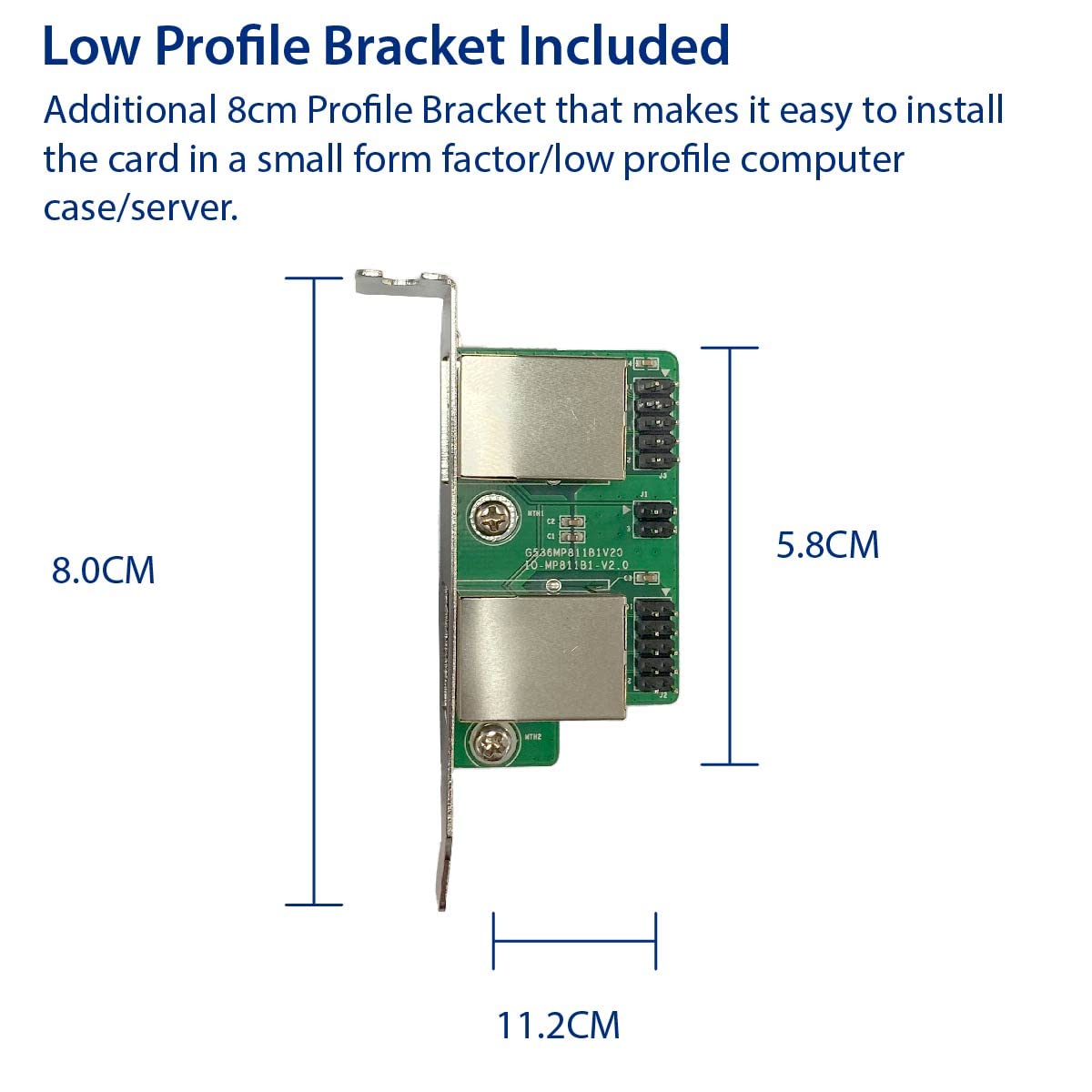
The IO CREST Dual 2.5 Gigabit Mini PCIe Ethernet Network Expansion Card delivers dual ultra-fast 2.5 Gbps Ethernet ports with broad OS compatibility and VLAN support, packaged with versatile bracket options for easy installation in both standard and low-profile systems.
Z**L
Great Value
This was exactly what I needed with 1 potentially big issue (Ill mention in cons). I needed a dual port Gigabit NIC that fit into a half length mini PCIe slot on a ASRock Z87E-ITX. I use this machine as a server with Windows Server 2012 R2 Essentials. The onboard Intel I217V is technically not compatible with Win Server but editing the inf makes it possible to install. This meant that I never update the driver as it would be a pain. It worked fine but I got a new router (ASUS RT-AC88U Wireless-AC3100 Dual Band Gigabit Router, AiProtection with Trend Micro for Complete Network Security) that supported teaming 2x Gigabit NICs for 2Gbps. I wanted to get a GBe NIC that supported Win Server 2012 R2, could be teamed, and supported other tech like jumbo frames.While I could have gotten a NIC that was standard PCIe (upto x16) I wanted to avoid this if I could because space is limited in my server. I was not using the min PCIe slot as it usually has a Wifi/bluetooth card and I didnt need that for the server. I was not having much luck finding dual port mini PCIe cards that I thought could support teaming. I came across an Intel I350T2V2 variant somewhere online but not from reputable sites and didnt want to take the chance. Then I stumbled on this at Amazon. I figured for $30 it was worth a shot and I could likely return it if I had problems.I am sure happy I tried it as it has exceeded my expectations.Pros:-Well packaged, seems well made physically-Cables are long enough but not too long (may be a problem in larger ATX or larger but in ITX or even an mATX build I think its reasonable)-Ports are spaced out well from each other.-Show as 2 distinct NIC's in Device manager-Win Server 2012 R2 installed drivers automatically (from 2013 for me)-Realtek website had installer from very recent in 2016 for drivers, as a bonus it didnt install other junk.-Supports 9k jumbo frames, WOL, etc.Cons:-NOT, I repeat NOT a Half sized mini PCIe card. This is full sized according to my understanding of the terminology/spec. Half size is ~26/27mm long and full is ~51mm. I didnt measure it exactly but my wifi card I removed is exactly 26mm and this was about 2x as long. It just barely fit and did not line up with the screw whole of the half height. It seems snug enough and I dont move my server ever so I am not worried about it.Other thoughts:Well worth it. Was getting 112MB/s xfer from desktop to server for a large files. I am now getting 118MB/s using this card (9k jumbo frames enabled). I also have the peice of mind that my server could output ~2Gbps to multiple devices at the same time. So far very happy I found this.
S**T
Nope on out of the Key A/E unit.
Wow. I've bought iocrest before and usually can make things work but this is just sad.1. PCB on the main module is very poorly marked. The on the breakout board with RJ45 port is fine but one side clear and one side crap isn't good enough when there is a 4 Pin connector that can go full rotation and a 10 Pin with no key pin.2. The cables are quite proud, so they will be a problem in many tight cases where someone wants to fit an adapter that connects to a typically low profile WiFi adapter slot.3. The documentation is useless. There is no pinout reference in any of the drawings even if they show lots of ways to do the really obvious stuff like attach the M.2 connector to the mainboard or the breakout board & slot panel to the case. If you don't already know these little bits, I'm a little concerned but to give lots of those in drawings but literally nothing about the orientation of the cables or pins that can go literally 2 ways (10 Pin) or 4 ways 4Pin)? Insult to injury, the wire colors on the Amazon images don't match and why do we need to go to amazon images when somebody put lots of time into useless images on the included info? Might be different if they shipped it with the parts connected but nope, separate baggies (I don't usually mind this).So all in all, it's a PITA. If it works for you, great and possibly the other variants are fine but the Key A/E version is useless. I've been doing this stuff since the late 90's as a professional, as in I remember when it was common to have to read a PCB to figure out jumper settings for almost everything, and I couldn't make this work. I recommend you move and try one with better docs. I'm actually quite disappointed in IOCrest with this one purchase.
J**Z
Would be perfect for the 7th Gen HP EliteDesk 800 G3 mini, but one minor design caveat prevents it.
This review is for the IO Crest 2.5 Gigabit M.2 M+B Key adapter. I bought this hoping it would work on a 7th Gen HP EliteDesk 800 G3Mini, since HP restricted the A+E slot to only recognize wireless adapters on the 7th Gen Mini.The card was recognized correctly using Fedora 40. I was able to browse the internet with no issues. My motivation for buying this is to use the Mini as a router. There's only one problem if you want to use this with a mini pc such as the HP EliteDesk. The pin connector headers being straight up are too tall for anything else to sit on top of them. In the case of the mini, the caddy for the SATA drive sits on top of the NMVE and WLAN M.2 ports. There's no enough clearance for the adapter's cable and the caddy to coexist. Same situation for the pin connector headers on the ethernet port end. If the pin connector headers of this adapter were setup at a 90 degree angle, this card would be perfect for a mini PC such as the EliteDesk. As it is, I can't use it because of not being able to install a SATA drive with this adapter in place. The search continues.Should work fine on a regular desktop B+M M.2 adapter as long as the mobo has enough PCIe lanes to support it.
G**U
Wonderful way to add nics without taking up a PCIE slot!
Works right out of the box in a standard m.2 slot. I wanted additional high-speed ethernet ports for my NAS build and had to use the PCIE slot for my raid card. This solved that issue flawlessly. No fussing with drivers or anything. Solid realtec nics with awesome compatibility. Cables are just long enough to reach the expansion slot and not so long as to get in the way.I will say the documentation is terrible. I had to use the product images on this listing to make sure I got the wires oriented the right way. They both go the same direction which helps, but as long as you do it the same as the picture it'll work.It looks jenky from the inside, yes, however if it works, I don't care. It looks pretty legit from the outside once everything is closed up. Very happy to find this solution!!
Trustpilot
Hace 1 semana
Hace 1 mes