We remain fully operational. Our teams are working around the clock to ensure your deliveries continue safely.

Descargar la aplicación


Servicios al cliente
Sobre nosotros
Copyright © 2025 Desertcart Holdings Limited
Descargar la aplicación
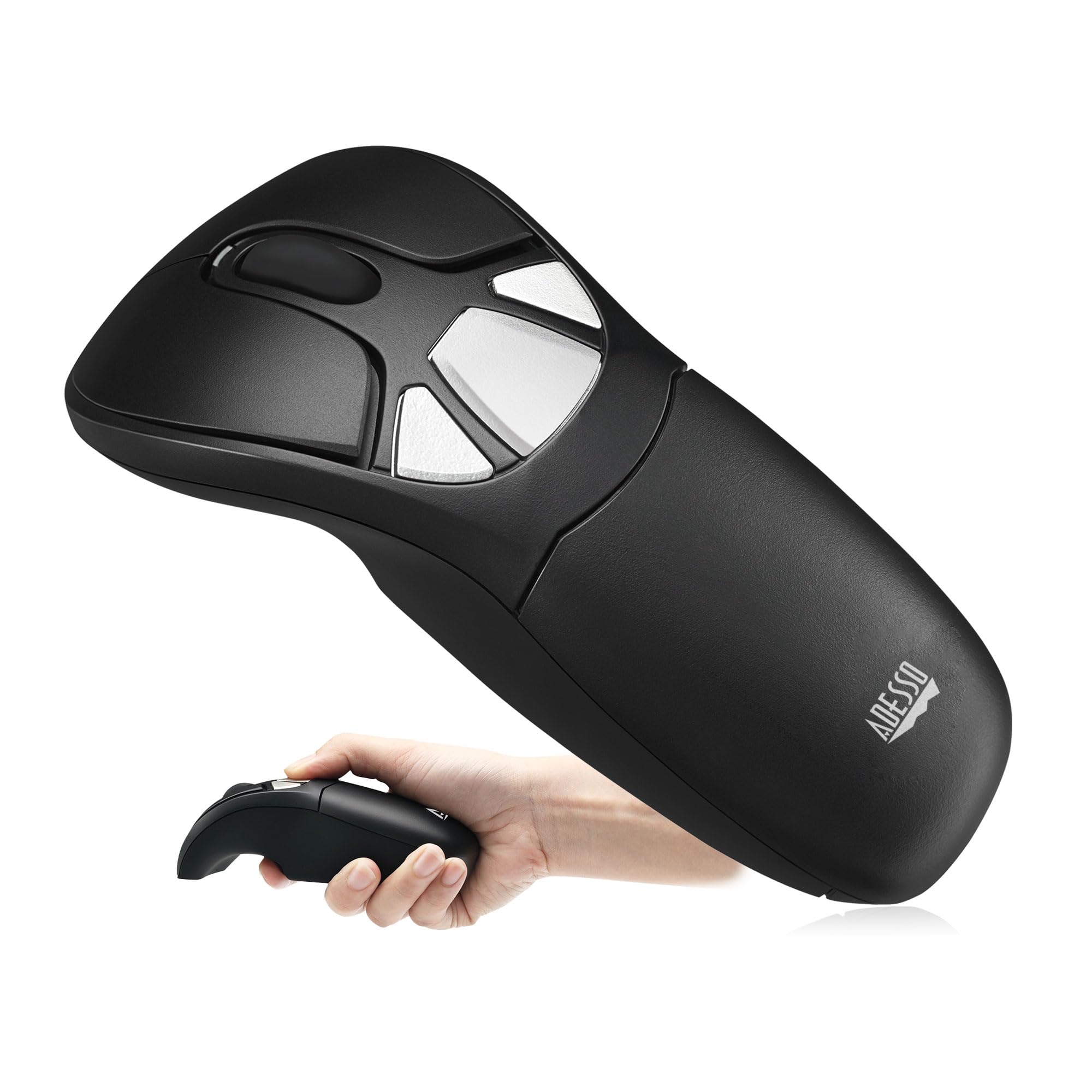


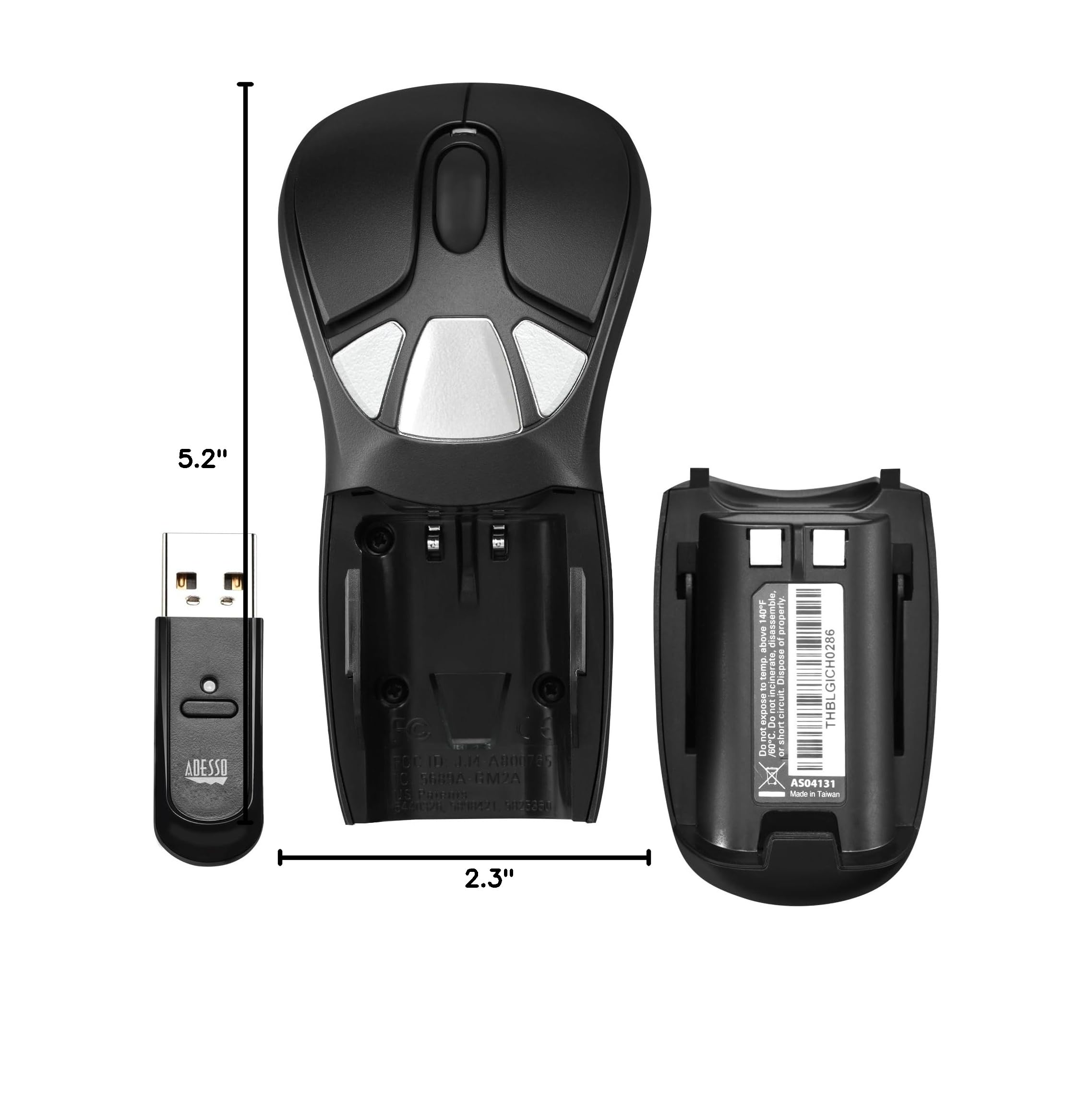
🖱️ Elevate your control game—command your space from anywhere with style and precision!
The Adesso iMouse P30 Air Mouse GO Plus is a versatile wireless cursor controller designed for professionals who demand seamless control across desktops, laptops, smart TVs, and presentation environments. Featuring a 100-foot wireless range, customizable buttons and hand gestures via MotionTools 3.0 software, and a rechargeable 400mAh battery with charging stand, it empowers users to navigate and present with unmatched freedom and precision. Compatible with Windows systems and backed by dedicated U.S.-based support, this device transforms any workspace or classroom into an interactive, mobile command center.





| ASIN | B09WZGWT88 |
| Batteries | 1 Lithium Ion batteries required. |
| Best Sellers Rank | #5,465 in Our Brands ( See Top 100 in Our Brands ) #895 in Computer Mice |
| Brand | Adesso |
| Color | Black |
| Customer Reviews | 3.7 3.7 out of 5 stars (34) |
| Date First Available | April 1, 2022 |
| Hardware Platform | PC |
| Item Dimensions LxWxH | 5 x 2 x 2 inches |
| Item Weight | 9.6 ounces |
| Item model number | P30 |
| Manufacturer | Adesso, Inc |
| Operating System | Windows Vista |
| Power Source | Battery Powered |
| Product Dimensions | 5 x 2 x 2 inches |
| Series | iMouse |
S**L
Works Very Well & the Software is on Adesso's Website
Excellent air mouse, and the best you can buy. This is a perfect air mouse solution if you're surfing the web or doing whatever, while sitting several feet or more from your PC, where using a mouse at a distance is not practical. You can even use these as a regular mouse, but they shine the most when used as an air mouse. The Motion Tools Software (version 1.90 driver/software) is available on Adesso's website, as well as extra batteries that you can purchase. (If you have an older version of Motion Tools 3.50 from Gyration, it'll work with this Adesso Air Mouse as well.) The mouse WILL work without this software, but you won't be able to configure the buttons for special actions, etc. I've had this same model under a different name (Gyration) more than a decade ago, but I recently broke it and needed a replacement. The first Adesso I received was not working correctly and had a shaky mouse cursor that would not respond at times. I returned it, and the following one worked as expected. I also bought another one as a backup. It'll be a shame if these are ever discontinued because there appears to be no worthy replacement for them.
S**N
For golf simulator
Was looking for an air mouse for my golf simulator because the PC tower is in another room and this works perfectly. Much better than a Bluetooth mouse on a stand at the side of the room. Highly recommend for this use.
A**R
This mouse does not work
I'm not sure if the mouse is received is the issue or if the issue is that it does not work with Windows 11, but it does not work. Additionally, the directions suggest downloading software but when I go to the given link there is nothing. Very, very disappointed.
A**M
great for ergonomics, very old hardware/software
first of all, I bought this since I have been suffering from tendinitis in my arms for 2 months, and after buying/ testing about 5 different types of mice, this was the one! I can operate this mouse with my arm straight down at my side using very little wrist movement. The ability to reconfigure buttons is fantastic, as I'm using this mouse for full-time work using Blender. as for Cons, the "mouse on the desk" sensor is WAY too sensitive, and even hovering it 6 inches away from any kind of surface locks the mouse and switches it to desk mode. I had to do digging to locate the software, as this is a 10+ year old mouse that the Gyration company sold to Adesso a ways back. Connecting was also a pain, I had to look up how to troubleshoot online and I was told to "hold the mouse within 1 foot of the dongle and hold the connect button for 10 seconds" which finally worked after 3 tries. After about a half hour of troubleshooting, I finally got it to work fine.
J**.
Awesome for my surveillance cameras
Finally found something perfect to be able to view all of my surveillance cameras on my smart tv!
G**.
Pretty cool mouse. Tough to get started though.
Right out of the box and into the NVR of my security camera system. Nothing worked. I almost started to get upset but wasn't surprised actually. I moved the receiving to a computer. Moved the mouse around. Nothing. Let the computer run the hardware installation. (No drivers were prompted for install.) Moved the mouse around (in the air)... nothing. Thoroughly read through the instructions. Had to play around with the very tiny connect button on the bottom. Eventually I saw the cursor flicker. I set the mouse down on the desk and the cursor moved. Picked it up again and moved it around in the air... nothing. I quickly figured out that I had to hold the trigger down to get it to move in the air. Seems... weird. Wish there was a way to calibrate it. At a flick of the wrist I can get the cursor to move to another monitor but it takes an entire wave of the arm to get it to highlight a word? Maybe it'll take a bit getting used to. Anyway, I didn't purchase it for a computer. Remember? I originally plugged it into my security NVR. So I tried that again. Held the trigger button and voila! It's working! Range it outstanding too! Most wireless input devices have a range of about 30 feet. Basically from one corner of the room the the nearest corner of the neighboring room. Occasionally you can get it to work from the center center if someone in the neighborhood isn't using their microwave or something. But this seemed to work throughout the entire level of the house! Which is exactly what I bought it for! It's setup to the NVR which the HDMI output is split into three monitors to which I can use the same remote and control/review as needed. So it's perfect for that. I kinda wish the charging dock was magnetic though. It just kinda sits on there. I knocked it off pretty easily while moving stuff around the desk. EDIT: After about a month of use the motion sensor stopped working. So it's basically an awkward shaped mouse now.
S**.
Sucks; Waste of money *UPDATED*
I've been trying to connect this thing to my laptop for a week now. Every time I email Adesso, they tell me to take the batteries out & re-install. The only problem is they are lithium batteries & there is ZERO WAY TO REMOVE BATTERIES. Anyways, I threw the box away. So, I'm stuck with this piece of junk. If I get this to work, I'll retract this review. But, at this time, DONT WASTE YOUR MONEY. ********UPDATE********After 3 people tried to get it to connect, my 24 year old step-son was able to get it to connect. So, I have given it 3 stars now. It's works pretty good now. But, I can't do better than 3 stars, since it was so difficult to get working.
M**O
Feels like the future.
It’s not going to last forever, but this is the best hybrid desk/presentation mouse I’ve used. Been a big fan for years and years.
R**E
Can use it as a regular mouse and also as a presentation tool.
Trustpilot
Hace 3 semanas
Hace 3 días