We remain fully operational. Our teams are working around the clock to ensure your deliveries continue safely.

Descargar la aplicación


Servicios al cliente
Sobre nosotros
Copyright © 2025 Desertcart Holdings Limited
Descargar la aplicación


Buy anything from 5,000+ international stores. One checkout price. No surprise fees. Join 2M+ shoppers on Desertcart.
Desertcart purchases this item on your behalf and handles shipping, customs, and support to Peru.
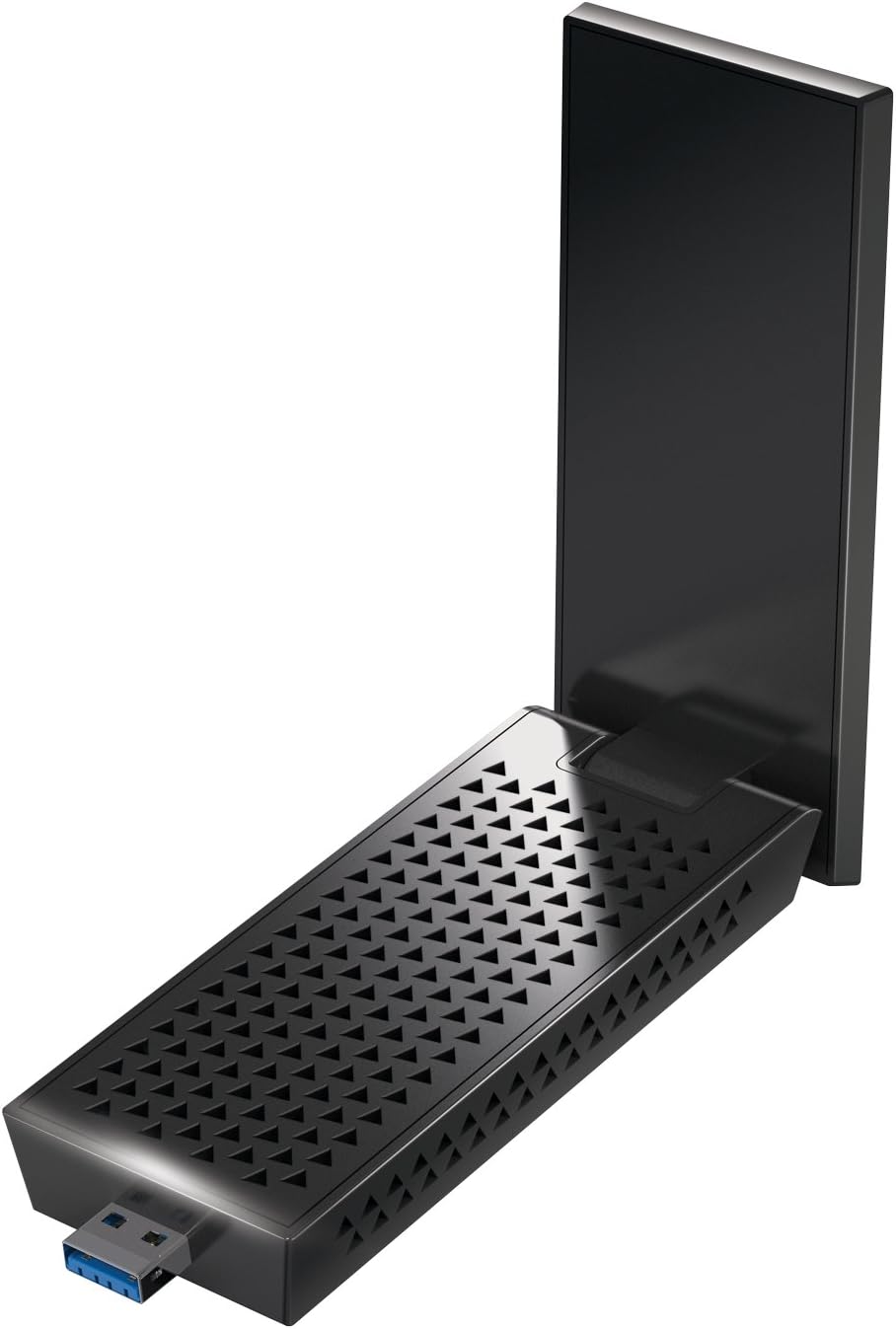
📶 Upgrade Your Wi-Fi Game: Connect Faster, Stream Smoother, Work Smarter!
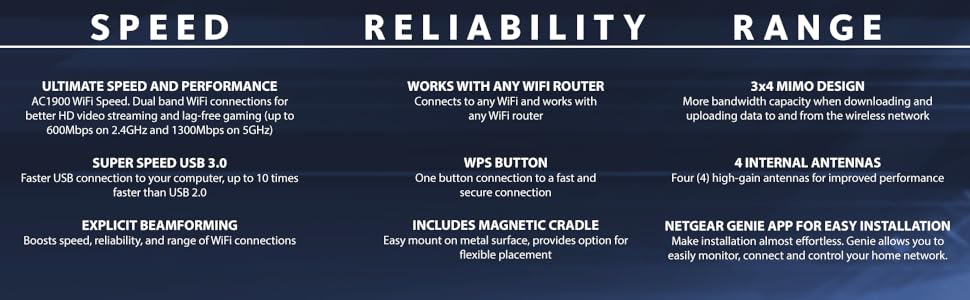
The Netgear Nighthawk A7000 is a high-performance AC1900 Wi-Fi USB 3.0 adapter designed for professionals demanding ultra-fast, reliable wireless connectivity. Featuring dual-band speeds up to 1.9Gbps, advanced 3x4 MIMO technology, and broad OS compatibility, it ensures seamless HD streaming, lag-free gaming, and stable connections even in challenging environments. Its magnetic cradle and intuitive Netgear Genie app simplify setup and network management, making it an essential upgrade for any modern workspace.




| ASIN | B073JHHNJ9 |
| Best Sellers Rank | #257 in USB Computer Network Adapters |
| Brand | NETGEAR |
| Built-In Media | AC1900 WiFi USB Adapter (A7000), USB 3.0 cable with magnetic cradle, Quick start guide |
| Compatible Devices | Desktop, Laptop |
| Compatible Operating System Family | MacOS, Windows |
| Customer Reviews | 4.3 out of 5 stars 5,137 Reviews |
| Data Link Protocol | 801_11_AC |
| Data Transfer Rate | 1900 Megabits Per Second |
| External Testing Certification | Não aplicável |
| Global Trade Identification Number | 00606449120882, 10606449120889 |
| Hardware Interface | USB 3.0 |
| Item Dimensions L x W x H | 1.81"L x 0.87"W x 4.72"H |
| Item Type Name | Netgear Nighthawk AC1900 Wi-Fi USB Adapter (A7000-10000S) |
| Item Weight | 2.35 ounces |
| Manufacturer | Netgear |
| Mfr Part Number | A7000-10000S |
| Model Number | A7000-10000S |
| Product Dimensions | 1.81"L x 0.87"W x 4.72"H |
| UPC | 606449120899 606449120882 |
| Unit Count | 1.0 Count |
| Warranty Description | 1-year Limited |
T**L
Works well thus far!
I bought this portable USB WIFI adapter to help with a computer that was located in a corner of the house which did not receive a good wifi signal. This unit definitely helped and this computer is now getting a better signal. I bought a used version of this wifi adapter as a new unit was too expensive for my liking. Overall, I would recommend this unit at the used price point, I am neutral about its price point as a new unit. Here are some of my observations: PROS: The unit does help increase week wifi signals. I can’t tell how much definitely but my signal level increased about two bars. The unit is stable with no signal breaks or drop offs. The unit is larger than most portable wifi units that I have used in the past. With its base, I would not use this unit at a coffee shop as it is very obvious and large. However, without its base, you can connect the unit directly to your laptop with no obvious issues. The base unit also has magnets which you can use to position it on a metal surface if you have one. The unit’s driver, which was described as rather large in the comments section, is divided into two types. One type is standalone and a complete suite. I just used the standalone and it worked just fine with no issues noted thus far. The installation was relatively simple with no hang ups noted. Thus far, I have encountered no issues with this unit. CONS: The unit is larger than most. If you use the base, it will use a portion of your desktop that otherwise would be vacant. Not a big issue if you have a normal desk; however, if you are in cramped quarters just be aware. I wish they provided a longer cord for the base unit and made the chord a little thinner; although, not a significant issue thus far. The unit is not plug and play. You have to download the driver, its in a zip format, then decide what driver unit you want to use. It has a standalone and a suite format. I just used the standalone and it worked fine, for me not an issue, but some may find it confusing. The unit uses USB 3 or 2, but for best performance you have to have a USB 3 port open. For some laptops, this may be an issue, especially if you have other devices already attached to the laptop. I use this unit on a desktop so I don’t have this issue. I have used this unit continuously for about two weeks thus far with no issues noted. Thus far, it works as advertised.
D**N
This is the one you should buy
My Mom needed a WiFi adapter antenna because the marina where she lives on her boat has one WiFi router and she's very far away from it so she barely gets any service. I bought this one from Netgear and a cheaper one from TP-Link because this one took longer to deliver and she needed one ASAP. The difference in performance between the two is MASSIVE. The TP-Link one improved the connection a bit, but it was still very slow and she couldn't have Zoom calls without the video and audio dropping out. Once she received the Netgear one, it was better than when she had a wired ethernet connection in her home. She also said that the setup was very fast and easy. Now she has zero problems with her internet. It's very fast and stable with no dropped connections, and no spinning wheel waiting for a page to load. I did a lot of research before buying one, and this is the best one by far. It's a little more expensive than the other ones, but you get what you pay for.
A**R
This device works super well!
I've upgraded my adapter from an Alfa AR9721. Which used to work marvelously, but it got old and brought my network speed down to 4-5mbs, this adapter shot my speed up to 200mbps. I love this beautiful adapter and it's power. I feel like I'm on ethernet right now. Hahaha, it's so epic. Thank you to the seller for shipping it so quickly for me to enable me to develop my projects without any hassle. I love this amazing adapter. I have not had such a strong network signal in a long time via Wi-Fi. It's brilliant! I'm just another one of your super satisfied customers friend. Thanks for this hardware! I love it! (I realize I'm probably sounding like a broken record, but getting such a speed output through network speed tests shocked the crap out of me). xD
J**F
Not bad
I use this adapter for in-home PC game streaming (steamlink, parsec, moonlight) at 1440p/120 and 4K/60 which requires a strong wifi connection to avoid video artifacts and lag/stutter. I'm using it with an Netgear Orbi WiFi 6 Mesh 6 Router and have the host gaming PC connected through ethernet. My laptop's built-in wifi wasn't good enough to handle my streams, but this adapter is able to with no problems and allows me to maximize image quality. The quality of my streams are now so high that I can't tell the difference between the stream and the actual native game. I went through several cheap adapters and none of them came close to being able to handle 4K game streaming - I always had to compromise the experience by lowering image quality, resolution, or framerate to avoid video stuttering. This adapter's throughput is only 867mb/s but it's consistent, I haven't seen it drop below that once. It is not perfect. One issue I have experienced is that when you have it connected to a PC that goes to sleep, sometimes the adapter doesn't work when the PC wakes back up. In which case you have restart the PC or unplug/replug the adapter. Admittedly, this could be a problem with the USB controller in my laptop but no other USB devices do this.
J**N
Fast and cheap usb
The wifi connection speed is fast for a usb adapter. The installation process is a bit of a pain, you either have to use the stand or hope you got a usb on top of pc and you have to download a software to make it work, but if your willing to do that you get a very fast wifi usb adapter for a great cost. Reccomend getting this
J**H
Not worth it, even after countless deep dives into fixing it
UPDATE: Okay now I'm beyond frustrated. Was working golden for a while now has absolutely nosedived in quality. My below fix lasted for a while but now nothing will help and it is completely failing me. I cannot keep up in my online classes now because they are not recorded and lag spikes every few minutes completely freeze me and I miss out on all the material discussed at those times. Would not recommend anymore. The Problems -- The two major issues I read reviews on before buying were frequent disconnections/lag spikes and how awful the Netgear genie is. When using the genie application, I agree that both are absolutely awful and it made my time using it a chore, because the only solution I found was uninstalling and reinstalling the genie, which was annoying and caused glitches. While this did work for a day or two at a time, there is a better fix. How to Fix Them -- Though the genie is used to connect to networks, it isn't needed. The trick to fix this is installing the driver from the genie independently. Because reviews don't let me put links, my best recommendation is searching YouTube for "fixing netgear a7000 genie and driver installation" by Samuel Hart. Their video details the process perfectly and will improve your experience with this adapter. When utilizing the driver and not the genie, I've had decent ping and my connection isn't dropping. With the genie, I wanted to smash the stupid adapter, getting slow speeds and constantly dropping out. This thing is decent/good if you just don't use the terrible, horrible, no good, very bad (like seriously they should be embarrassed by this) program they say you need to use it. Internet where I live is fairly poor, and using the device driver WITHOUT the genie still had a significant benefit. When the program made my problem even more of an issue, I thought the adapter was a lost cause. So seriously, look up that YouTube video (or just install the driver if you already know how) and hopefully you'll also find that this is a solid device that does a good job, permitting you know how to set it up properly. @Netgear your program literally makes life harder. Will you read this, no. I just wanted to say this because it seriously sucks and I hate you for it.
N**R
Easy installation
Easy installation and was up and running almost immediately.
S**M
Awesome speed and range
I have been using an external usb wifi dongle on my macbook since my internal wifi has not been working for some years now. I have a 1Gbps broadband connection and before I got the Netgear A7000, I was using a Dlink DWA-172 and a TP-link Archer T2UH_V2 usb wifi dongles and I could only achieve an average internet speed of only 145Mpbs download. After I changed to the the Netgear A7000 (which is the only Netgear wifi dongle able to support Mac OS upto MacOS 10.13), my speed almost doubled to an average of 240+Mbps with excellent range, being far away from the router. The limitation of the bandwidth I get is due to the USB2.0 port on my old macbook which has a theoretical throughput of 480Mbps. I am sure if I had a USB3.0 port, I would be able to get blazing speeds of upto 1.3Gbps (which the A7000 supports) The other unique feature of the A7000 is that it supports Enterprise security networks connections which my other 2 wifi dongles do not. Note that the A7000 is uni-directional which means that you can aim the antenna in the direction of your router to get better speeds. The negative of the A7000 is its form factor which is pretty large compared to my other 2 dongles. Luckily, it comes with a caddy with its own usb 3.0 cable which you can hook it to so that it will not block your other ports when connected to your computer, especially a laptop. Overall, I give it 5 stars just on its performances on speed and range alone. A well-built product and worth the investment.
Trustpilot
Hace 1 día
Hace 1 semana