We remain fully operational. Our teams are working around the clock to ensure your deliveries continue safely.

Descargar la aplicación


Servicios al cliente
Sobre nosotros
Copyright © 2025 Desertcart Holdings Limited
Descargar la aplicación






Buy anything from 5,000+ international stores. One checkout price. No surprise fees. Join 2M+ shoppers on Desertcart.
Desertcart purchases this item on your behalf and handles shipping, customs, and support to Peru.
⌨️ Compact power, endless play — your desk’s new MVP!
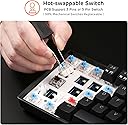
The RK ROYAL KLUDGE RK61 is a sleek, ultra-portable 60% mechanical keyboard featuring versatile triple-mode connectivity (Bluetooth 5.0, 2.4GHz dongle, and USB-C wired), hot-swappable blue switches for effortless customization, and a high-capacity battery delivering up to 13 hours of continuous use. Its dynamic single-color backlighting with 17 modes enhances your setup with subtle style, making it the perfect choice for gamers and professionals craving performance and portability.


| ASIN | B0731H35J8 |
| Additional Features | Backlit, Hot-Swappable |
| Antenna Location | Business, Everyday Use, Gaming, Student |
| Best Sellers Rank | #1,740 in Video Games ( See Top 100 in Video Games ) #38 in GEM Box Microconsole #156 in PC Gaming Keyboards |
| Brand | RK ROYAL KLUDGE |
| Built-In Media | USB Cable |
| Button Quantity | 61 |
| Color | Black |
| Compatible Devices | Laptop, Smartphone, Tablet |
| Connectivity Technology | BT5.0, Wireless 2.4G, USB-C |
| Customer Reviews | 4.5 4.5 out of 5 stars (9,528) |
| Enclosure Material | Acrylonitrile Butadiene Styrene |
| Hand Orientation | Ambidextrous |
| Item Dimensions L x W x H | 11.5"L x 4.02"W x 1.54"H |
| Item Weight | 480 Grams |
| Keyboard Backlighting Color Support | Single Color |
| Keyboard Description | Gaming , Mechanical |
| Keyboard Layout | QWERTY |
| Manufacturer | RK ROYAL KLUDGE |
| Model Name | RK61 |
| Model Number | 903338280 |
| Number of Keys | 61 |
| Number of Sections | 1 |
| Power Source | Battery Powered |
| Processor Count | 1 |
| Series Number | 903338280 |
| Style Name | Contemporary |
| Switch Type | Clicky |
| Theme | gaming |
| Unit Count | 1.0 Count |
B**G
Overall a good starter 60% Bluetooth Mechanical Keyboard, especially given the price!
PRO * Very affordable 60% Mechanical Keyboard, especially given the Bluetooth connectivity. * OEM Keycaps are actually fairly thick in comparison to other mechanical keyboards in this price point. When measured with digital calipers the factory OEM keycaps were around 1.3mm. (EnjoyPBT or GMK keycaps are 1.4 and 1.5mm respectively). * Keyboard has fairly standard keycap sizes which makes switching to an aftermarket keyset easy and painless. * Surprisingly sturdy build especially given the price point. * On/Off toggle switch for the Bluetooth radio on the bottom of the keyboard. * LED indicator under spacebar for when keyboard is charging. CON * Bluetooth is Bluetooth version 3. However, for general typing use this shouldn't be an issue and wasn't an issue in any of my experience. However, if used for gaming you might want to play plugged in via USB to avoid any latency. * As I generally use fully programmable keyboards or keyboards such as the HHKB Professional BT where the Control key is where the Caps Lock key is placed, I'd really like to be able to reprogram the keyboard layout via a desktop application or perhaps via an Android/iOS application such as what is present on the Anne Pro from Obins. This is also true of the arrow key placement as I'd prefer to use HHKB style arrow clusters or at least vim arrow keys (hjkl). IMPROVEMENTS * Would like to see different switches offered such as Gateron Silents. * Perhaps switch to white LEDs as this would be more pleasing and would match with aftermarket keysets better. * See misc improvements or changes I'd personally prefer to see throughout the review. MISC FEEDBACK * The model I am reviewing had a generic Cherry MX Blue switch in it. Normally, I'm not one to use a clicky MX switch as I tend to prefer Cherry MX Silent Blacks (Linears) or Zealios (67g Tactile) or Topre style switches. * Personally, I'd prefer to have paid $5 more to obtain this board with a different selection of switches (Gateron Silent Blacks for linears, maybe Silent Gateron Browns for Tactiles?) over the switches included. * When utilizing the LEDs the Caps Lock key is not turned on by default, unless caps lock is active. I'd prefer to have all keys lit if LEDs are activated and when caps lock is turned ON to have the LED shine a different color via an RGB LED in this switch.
T**G
good quality
good
J**N
Quality of the switches, Wireless
update (2020.4) : I am not changing 4 star rating but I could fix the issue by myself. so here is few tips for the users suffering similar issue. The popping key cap could be fixed using adhesive residue that I could scrap from tape. I could use a glue but at the time I didn't have it. and it could smear into switch mechanism to ruin the switch. This little amount of adhesive scraped from tape worked perfectly and safely. And another tip for Mac users. hard to type due to complicated combination of keys to type "?" could be solved through letter replacement under keyboard setting in Mac OS. I personally have set two exclamation mark to be replaced to question mark. I hope this helps. this keyboard is a joy to use and joy to hear. It was little challenging to figure out short cuts at first. But once it’s done, this keyboard has become one of my favorite keyboard of all time. It just has perfect combination of everything. Size, quality, wireless and price. I didn’t even expect this keyboard to be this good. 4 stars : I'm adjusting minus 1 star from previous 5 star rating. some key caps pop out if I type really fast. I'm thinking about putting some glue to those key caps to switches. Other than that it's OK 3 stars : I have been using this keyboard as a 2nd keyboard. so the mileage wasn't too long. but one of the key is not working now. I'm sad that this keyboard couldn't keep up with real use.
S**R
Unbeatable for the price.
After much searching, I finally decided to pull the trigger on and RK61. I had trouble finding anything for the price, wired or not. Those devices that were close in price, were wired, didn't have comparable features, or were simply ugly. Given the price point, I was skeptical, but after several weeks, I can happily report a happy purchase. The only issue I encountered was mentioned in the reviews, there was a very noticeable wobble, as one of the four rubber pads on the underside, was slightly more recessed than the other three. The quick and easy fix was prying up the pad with a knife point, removing the adhesive pad (shown in picture) and adding a couple dabs of hot glue, before pressing the rubber pad back in. I then flipped the keyboard over and pressed gently to make sure it leveled with the other three. Presto, no more wobble, I hope this helps if anyone was on the fence for that reason. Bluetooth range is good, I can easily use the keyboard across the room. Bluetooth compatibility in windows and a recent linux distro has been great, no pairing issues. One quick hotkey swaps between wired and wireless modes. You can easily cycle through the backlight modes, or turn them off entirely. I tend to use a constant glow on lowest brightness, and at least for me it's not overpowering in a dark room. The swapping between number keys/ arrow key, and their default functions takes a bit of getting used to, but after you adapt it's not a problem. Check images in customer reviews for the hotkey settings that allow you to swap between. I had an odd issue where Num Lock was enabled by default on delivery. It took me a few minutes to figure out what the issue was, and that there is no way to toggle this setting from the RK61 at least from what I've found. Solution for me was a backup keyboard used to deselect the lock. It hasn't re-occurred, just make sure you have another keyboard handy when you're setting up. Haven't used the keyboard for gaming as of yet, but I will update the review once I've tested the keyboard for rollover. 5-key is what was advertised, I can attest to at least three, by nature of several hotkey functions built into the firmware.
J**L
Well, I’ve been after a small white mechanical wireless keyboard for some time now, intended. It to look at Amazon in my hunt as when you type the parameters “gaming” and “keyboard” into the search, the amount of pure rubbish that turns up is incredible. However when I read a top 10 list of 60% keyboards on a trusted review site and this guy featured, I thought I’d take a look. When it arrived I was amazed at the quality. For less than £50 I thought it was gonna be a bit cheap feeling, but actually it’s expensive feeling. It has a solid chassis, next to no deck flex or twist. The actuation of the key switch set is fantastically clicky and tactile (if that’s what you’re after), and even though it’s Bluetooth ive not noticed any discernible input latency (though I’m not a competitive shooter kinda guy or anything). I’ve been using for over a week now and apart from the initial charge, only charged it once (after 5 days of fairly heavy use), which took no time at all due to its usb-c interface, which can also be used to make it wired. The blue backlight is excellent. It can be super bright if you want, but I turn it right down to lowest and it’s still great. Each key is individually lit and can be individually turned on or off, and there are many different lighting patterns. Colour cannot change though, it’s cyan all the time, but looks really well implemented. The one I have is the American key layout, so if you’re set on UK layout then this isn’t for you, but I just changed my windows language settings to add “English (US)” as well as “English (UK)” so I had the option to change my keyboard language to match the RK61’s key layout. It’s very easy to get used to. Overall I’m extremely pleased with my purchase and would recommend anyone to give this board a go. It really did surprise me.
A**N
Le seul défaut à donner c'est que c'est compliquer à utiliser en bureautique mais pour le gaming c'est parfait , et que les touches se salissent un peu vite
F**N
This keyboard is absolutely perfect in every way. The build quality feels premium, the keys are responsive and comfortable, and the overall design is sleek and practical. It delivers exactly what you’d expect and more, no complaints whatsoever. Highly recommended for anyone looking for reliability and performance.
R**A
klik fqrfe głośny
A**S
Comprei pensando que vinha a versão golden, mas veio a versão RGB. A parte boa é que nessa versao com RGB da pra selecionar a cor branca solida e efeito estatica , que ate prefiro do que a versao so golden. Apesar de no meu caso eu ter ficado satisfeito - o teclado e um dos melhores que ja usei, digitacao macia e sem fio enrolando tudo - nao ignoro o fato de o pedido ter vindo trocado. Vendedor deve ter mais atenção pois uma hora pega algum cliente que não vai se sentir tão satisfeito assim.
Trustpilot
Hace 2 semanas
Hace 2 semanas