We remain fully operational. Our teams are working around the clock to ensure your deliveries continue safely.

Descargar la aplicación


Servicios al cliente
Sobre nosotros
Copyright © 2025 Desertcart Holdings Limited
Descargar la aplicación
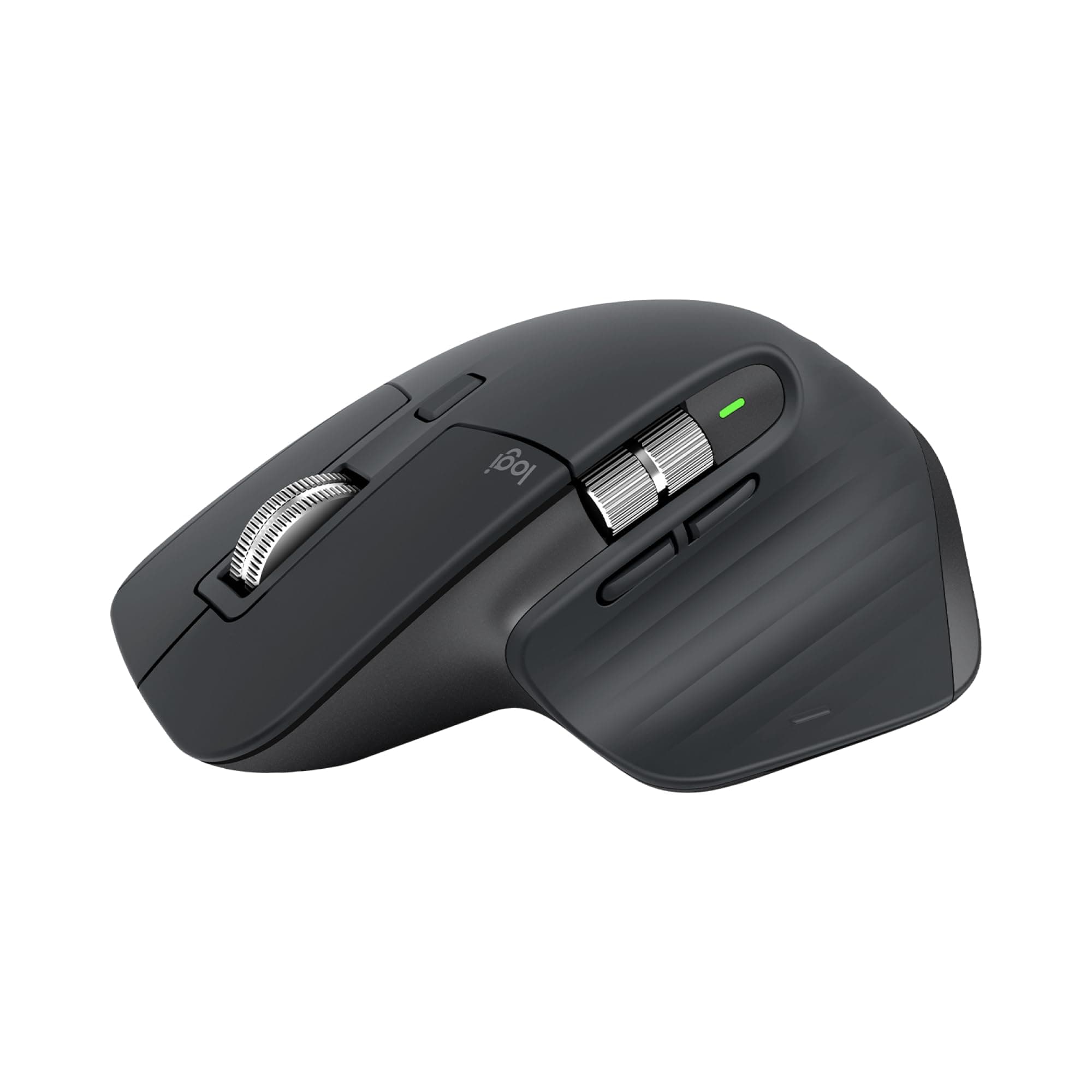
🖱️ Elevate your workspace with the MX Master 3S — where precision meets silent power.
The Logitech MX Master 3S Wireless Mouse Standard Edition redefines professional productivity with an 8000 DPI Darkfield sensor that tracks on any surface, including glass. Featuring 90% quieter clicks and MagSpeed scrolling that’s 90% faster and 87% more precise, it offers a near-silent, ultra-responsive experience. Connect up to three devices via Bluetooth or the included Logi Bolt USB receiver, and switch seamlessly with FLOW cross-computer control. Designed with ergonomic comfort and sustainability in mind, it incorporates 27% post-consumer recycled plastic and a soft rubberized finish that resists fingerprints. Compatible across Windows, macOS, Linux, and Chrome OS, this rechargeable mouse boasts up to 70 days of battery life, making it the ultimate tool for the modern multitasking professional.


| ASIN | B09HM94VDS |
| Additional Features | Lightweight, Portable, Rechargeable, Wireless |
| Antenna Location | Office |
| Are Batteries Included | Yes |
| Are Batteries Required | Yes |
| Battery Average Life | 70 days |
| Best Sellers Rank | #46 in Computer Mice |
| Brand | Logitech |
| Built-In Media | Mouse, Logi Bolt USB receiver, USB-C charging cable, user documentation |
| Button Quantity | 7 |
| Color | Graphite |
| Compatible Devices | Laptop, Personal Computer |
| Connectivity Technology | Radio Frequency, USB, Wi-Fi |
| Customer Reviews | 4.4 4.4 out of 5 stars (11,170) |
| Enclosure Material | Plastic |
| Hand Orientation | Left |
| Hardware Platform | Mac, PC |
| Item Dimensions L x W | 4.92"L x 3.32"W |
| Item Weight | 4.97 Ounces |
| Manufacturer | Logitech |
| Model Name | MX Master 3S |
| Model Number | 910-006557 |
| Mouse Maximum Sensitivity | 8000 Dots per Inch |
| Movement Detection | Optical |
| Number of Batteries | 1 Lithium Polymer batteries required. (included) |
| Operating System | Multi OS |
| Power Source | Battery Powered |
| Range | 10.0 meters |
| Style Name | Mouse |
| Theme | Computer Accessories |
| UPC | 097855174789 |
| Unit Count | 1.0 Count |
| Warranty Description | 1 Year Limited Hardware Warranty |
J**.
Best mouse I've used so far
This mouse is a nice upgrade from my previous one, also a Logitech mouse. The design feels more comfortable to use compared to the previous mouse I was using. The thumb wheel is very convenient when I need to scroll left or right in a spreadsheet. The left and right buttons have a satisfying quieter sound and the metal scroll wheel is great for scrolling quickly. This mouse has many options for assigning tasks for the buttons depending on your needs. It's well built, has a bit of weight to it which makes it feel more premium in my opinion. I've only had the mouse for close to a month, but I have not experienced any issues with it at all. The battery life is more than sufficient in my experience, and charging the mouse doesn't take hours. The option to connect via the USB connector or Bluetooth makes it easy to use on multiple devices, up to 3.
J**.
Love this mouse. So many features.
I have been a fan of the MX Performance mouse for quite a few years, and was bummed when I found out it was no longer available. I am one that wants more than a 3-button mouse and loves having the option of setting up various buttons to simplify various tasks. I decided to try the Logitech MX Master 3S mouse, and have been using it over 2 months. I love it even more than the MX Performance mouse. This mouse connects with the supplied Logi Bolt Receiver and configured using the Logi Options app which shows Logitech products connected to both the Bolt receiver and the Bluetooth receiver. I have the Logitech MX keys keyboard that is connected to the Bluetooth receiver that is internal on my computer but can still be configured using the Logi Options software. So, why do I love this mouse and prefer it over the MX Performance mouse? 1) The MX Master 3S mouse is covered with a soft rubberized covering that does not show fingerprints or collect oils from fingers. The MX Performance mouse is plastic and eventually collects oils that look grubby which needs cleaning. 2) After installing the Logi Options software, the Logi Bolt receiver was instantly seen on my computer and the MX Master 3S mouse was easy to install on my computer. 3) Using the Logi Options app, this mouse is so much easier to configure for different programs that may use the buttons differently. For the MX performance mouse, I had to configure it for different programs by entering a combination of keys. This is all supplied in the Logi Options app. You need only to select the apps you want the mouse to be compatible for. Some of the pictures are some of the Logi Option app screens. 4) The Logi Options app can also be used to configure Logitech products connected to the Logitech Bluetooth receiver. 5) There is no need for a mouse pad. This mouse works equally well on any surface. 6) The battery charge lasts for much longer than the MX Performance mouse. I have had this mouse over 2 months and use it for at least 5 hours or more every day. I have charged it once in that time. The only downside I can think of comparing this mouse to the MX Performance mouse is that the rechargeable battery is not replaceable. When the battery goes, you have to buy a new mouse. Other than that, this model is far superior to prior models for both performance and battery longevity between charges. If you need a new mouse and like to have options, I highly recommend this mouse. If my opinion changes, I will update this review. I hope this review was helpful for you.
S**M
comfortable, responsive, and packed with productivity-boosting features.
I've been using the Logitech MX Master 3S (Standard Edition) for both work and gaming, and it’s honestly one of the best mice I’ve used — especially if you have big hands and prefer comfort without sacrificing performance. Comfort & Ergonomics: Right away, the MX Master 3S felt much more comfortable than most standard mice. The larger, sculpted design supports my palm and thumb really well, which matters if you spend hours editing documents, coding, or grinding in games. My hand never felt fatigued even after long sessions. Performance: The sensor is very responsive, and tracking is smooth on most surfaces. It’s not marketed strictly as a gaming mouse, but in fast-paced games it still performs really well — precise cursor movement and consistent responsiveness. For professional work (spreadsheets, design, multitasking), it’s exceptionally good. Buttons & Features: I love the programmable buttons, especially the side thumb wheel and gesture button — they boost productivity in creative apps and everyday tasks. Logitech’s software makes remapping and setting custom actions easy. The Logi Bolt USB receiver and Bluetooth connectivity are both reliable, and switching between devices is seamless. Battery life has been impressive too — I’ve gone days without needing to recharge even with heavy use. A couple of things to know: Because of its larger size, it really does benefit big hands. If you have smaller hands, it might feel too big or awkward. It’s not the absolute best choice if your sole priority is competitive gaming — dedicated gaming mice with ultra-high polling rates and lightweight builds might edge it out there. But for a mix of gaming and professional work, it’s incredibly versatile. Overall: The Logitech MX Master 3S is excellent — comfortable, responsive, and packed with productivity-boosting features. It’s not just a “good work mouse”; it handles gaming better than most non-gaming mice I’ve tried. If you have bigger hands and want one mouse that does everything well, this one’s a top pick.
A**Z
Good.
K**M
Very high quality and very productive
A**Y
Very good product, but i need the redeem code of creative cloud as it described
M**A
Muy recomendable súper cómodo, la batería dura muchísimo, lo puedes conectar por Bluetooth sin necesidad del receptor, trabaja en cualquier superficie ya sea cristal un otro material, este es para diestros pero también existe uno para zurdos
N**R
Very comfortable to use, smooth and precise scrolling, and the quiet clicks are a big plus. Works perfectly on different surfaces and feels premium overall.
Trustpilot
Hace 2 días
Hace 2 meses