
🖱️ Elevate your workflow with the original vertical mouse – comfort meets control!
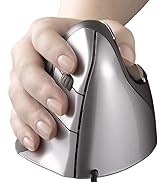
The Evoluent VerticalMouse 4 is the pioneering ergonomic mouse designed to reduce wrist strain and carpal tunnel risk by promoting a natural handshake grip. Featuring 6 customizable buttons, 4 adjustable pointer speeds with LED indicators, and a sculpted design for medium to large hands, it enhances productivity and comfort. Widely recognized and adopted by global companies, this wired mouse offers reliable precision tracking and extensive customization options, making it an essential tool for professionals seeking both health and efficiency in their daily computing.







| ASIN | B00427TAIK |
| Batteries | 1 A batteries required. |
| Best Sellers Rank | #420 in Computer Mice |
| Customer Reviews | 4.4 4.4 out of 5 stars (2,272) |
| Date First Available | August 3, 2017 |
| Department | Default Category |
| Is Discontinued By Manufacturer | No |
| Item Weight | 7.1 ounces |
| Item model number | VM4R |
| Language | English |
| Manufacturer | Evoluent |
| National Stock Number | 0 |
| Product Dimensions | 5.4 x 3.6 x 3.6 inches |
A**D
Excellent ergonomics, solid gaming, but occasionally spins out
This replaced my previous mouse from the same company after it died. This version upgrades several things. Grip is even more comfortable, which I didn't expect. So it continues to keep away wrist pain for me. An extra button is fantastic. And the sensitivity level switch is more user friendly than before. I have only good things to say about the ergonomics and quality as an office mouse. If you want this for gaming, be aware that there's an adjustment period to a vertical mouse. But the number of buttons and customization software are excellent. I only have one gaming complaint. The mouse will spin out on very fast motions. So if you game with low sensitivity and make large fast motions from the shoulder, this may not be the mouse for you. For everyone else, it should be a great option. Oh, and for hand size, my fingertips extend past the buttons on the XL size. I have normal-ish tall person hands. This isn't a problem, since pressing against the front edge of the button works fine. But you might want to consider one size larger than you would expect.
C**T
Evoluent Mouse Works Well
I've been using the Evoluent mouse for about 3 months now. It works well and is quite comfortable. The vertical hand orientation used with the mouse has definitely improved hand and arm issues I was having when using a traditional horizontal mouse and would recommend it to anyone having repetitive strain type issues as a result of too much mouse/computer use. I'm using the mouse with an Apple Macbook Pro. Since the mouse doesn't come with drivers that work with a Mac, I've used the recommended third-party USB Overdrive drivers that can be downloaded. When used with USB Overdrive, the mouse is fantastic. The mouse has 6 buttons (the scroll wheel doubles as a button) that can be assigned a variety of functions, including keyboard shortcuts and menu selections. With USB Overdrive, the mouse can be configured to do different things in different applications, customizing how the mouse works dependent upon which application one is running. I've found that ability allows me to work much faster and allows me to reduce the number of sweeping mouse gestures that are required to select menu items on opposite sides of the screen. In summary, I'm quite pleased with the mouse and would highly recommend it to anyone wanting increased mouse functionality and/or anyone having repetitive strain hand and arm issues from too much mouse work.
T**G
Best ergonomic pointing device I've used yet!
The Evoluent Vertical mouse 4 is fantastic. As my job involves nearly all day computer use, I've begun developing wrist pains and burning forearms on a regular basis from constant mouse usage. I had tried several ergonomic solutions before the Evoluent including, but not limited to: Trackballs Adjustable mice (Such as the R.A.T. 9) Trackpads (Such as the Apple Magic Trackpad) Pen based (Wacom tablet) and other vertical mice (LuguLake Vertical Mouse) I also make use of a slanted mousepad to increase the natural position of my hand on all these ergonomic solutions. It wasn't until I tried a vertical mouse (LuguLake) that I began feeling relief from my wrist pain. I initially was going to purchase the Evoluent mouse, but was a bit put off by the price. When I saw the LuguLake mouse at only $10 I thought that would be the perfect test of a vertical mouse. The LuguLake worked very well for my ergonomics, but the cheap construction and only 3 buttons made me reconsider the Evoluent. I'm very happy that I did. The VerticalMouse 4 has a fantastic solid feel. The materials used are of decent quality and ergonomically the shape is far better than that of the LuguLake. It also tracks better, has adjustable DPI, and much nicer button feel. I particularly appreciate the 6 customizable buttons. The software for configuring the additional buttons is decent. It's a smaller utility without the extra bloat you find in a lot of other mouse configuration software. One nice additional feature is the ability to use one of the buttons (by default the lower thumb button) as an "alternate" switch. Meaning, you can configure any of the regular buttons as dual purpose. One for normal click and one for while the thumb button is depressed. This expands the "usable" number of buttons from 8 to 12 (if you include the scroll wheel). I couldn't be happier with my VerticalMouse 4. I'm glad that I bought the LuguLake and was able to test a vertical mouse for an inexpensive price, but ultimately if I could do it again I'd simply buy the Evoluent mouse first and not only save some money, but start with a better product.
N**R
It is very useful for healing wrist pain due to extended use of mouse.. I would recommend it to everyone using the mouse for long duration ..
T**G
Compré este ratón por un problema en la mano y la verdad es que me ha resultado de mucha utilidad. Tiene un manejo sencillo y te haces a él enseguida. Es cómodo y ágil y la posición de la mano es buena. Ha mejorado la posición del brazo y ha disminuido el dolor considerablemente. Estoy muy contenta con el producto.
D**4
C'est ma seconde souris de ce modèle, la première commençait à manquer de précision après 4 années de service à temps plein (2011 à 2015). Soit une durée plus longue que les autres marque que j'ai eu avant. On prend vite l'habitude de ce type de souris et le double clic sert souvent. De plus, avec Win 7, Win 8 et Win 10, le clic droit est fréquent et les doigts sont bien positionnés. La lumière "bleue" peut plaire ou non, par contre, les témoins vert de réglage de précision sont intéressant pour certains logiciels (dessins notamment).
K**Y
Not only is its higher angle than other vertical mice helpful in removing wrist strain, its well thought out comfort and usability make it a very productive device at that. In a few hours of usage, its fit feels natural. For those that gripe about the challenges of straining new muscles to position their pointer, they need to utilize more their fingertips and thumb, with its well sculpted cavity, for fine motion. We do that with pencils and pens (remember those inventions?) Anchoring your palm's side might save a lot of effort with small precise movements, with your wrist on a wrist rest too. And moving your arm for more coarse positioning in the "handshake" posture feels natural if not more so than flat mice. Optical, infrared sensing and 2600 DPI resolution should be high enough to satisfy many gamers, maybe not the hardcore twitch variety. But for desktop app use, sometimes dropping to 1800 and 1300 DPI (depending on screen size) with the pointer's acceleration sensitivity to the minimum (maximum threshold before accelerating) will help you improve slow speed accuracy. Browsing hyperlinks on a 2k screen is fine for me at 2600 DPI, but sometimes I need something lower for letter-precise aiming in editing text. The main buttons, including an ingenious middle button that's not forced to reside as the wheel, are considered to be a very light touch by a reviewer, but I measure left and right actuations at approximately 40 grams of force. I suppose knowing membrane switches can start down as soft as 25 gf should have taught me to take subjective anecdotes with a grain of salt. It feels as firm as many mouse buttons do. The clicky sounds are definitely pronounced. The wheel in between the left and middle button can be spun more quickly by operating it with the index and middle fingers. Tilt-to-move works like a charm and it's possible to move the mouse's body and not upset the screen blanker, thanks to an angled foot. Just follow the instructions on the insert. Although, it's not as reliable as a serious gaming mouse, which shouldn't even register 1/16000th inch of movement, for example. The highly mounted top thumb button (9 cm off the surface!) is easily struck if you're switching your hand from an unsplit keyboard on the left by touch for the first few days. So make sure it's not set to something that performs an irreversible action. It's the 'back' button by default and I have to watch out for it typing this review in a web browser. That's not an issue if you place your mouse in between split keyboard halves or in front of it. Before this review sounds like a shill, I am peeved this costs as much it does, and there are seldom sales nor used units available. And with reviews of low durability too, leaving me wondering if there are better values out there competing for Evoluent's mindshare and rank. And it costs more than many wired gaming mice which represent the pinnacle of performance, convenience and endurance, not that those should be the definitive benchmark for this market. But I'd have to conclude with so much product design executed well, we are getting what we pay for. And at least we get a gaming grade sensor that proves to be a very accurate tracker, even without a good gaming mouse pad. Hint: If you have to temporarily go left-handed, the thumb buttons can be programmed as left/right buttons and the mouse still operates comfortably, vertically and functionally.
A**N
Cela fait des années que je me sers de cette souris et je n'en voudrais plus aucune autre. Elle est particulièrement ergonomique, facile à utiliser. Dommage qu'elle ne soit plus vendue par Amazon et qu'on ne puisse, en tout cas dans mon pays, la recevoir en point relais.
Trustpilot
Hace 2 meses
Hace 4 días



