We remain fully operational. Our teams are working around the clock to ensure your deliveries continue safely.

Descargar la aplicación


Servicios al cliente
Sobre nosotros
Copyright © 2025 Desertcart Holdings Limited
Descargar la aplicación
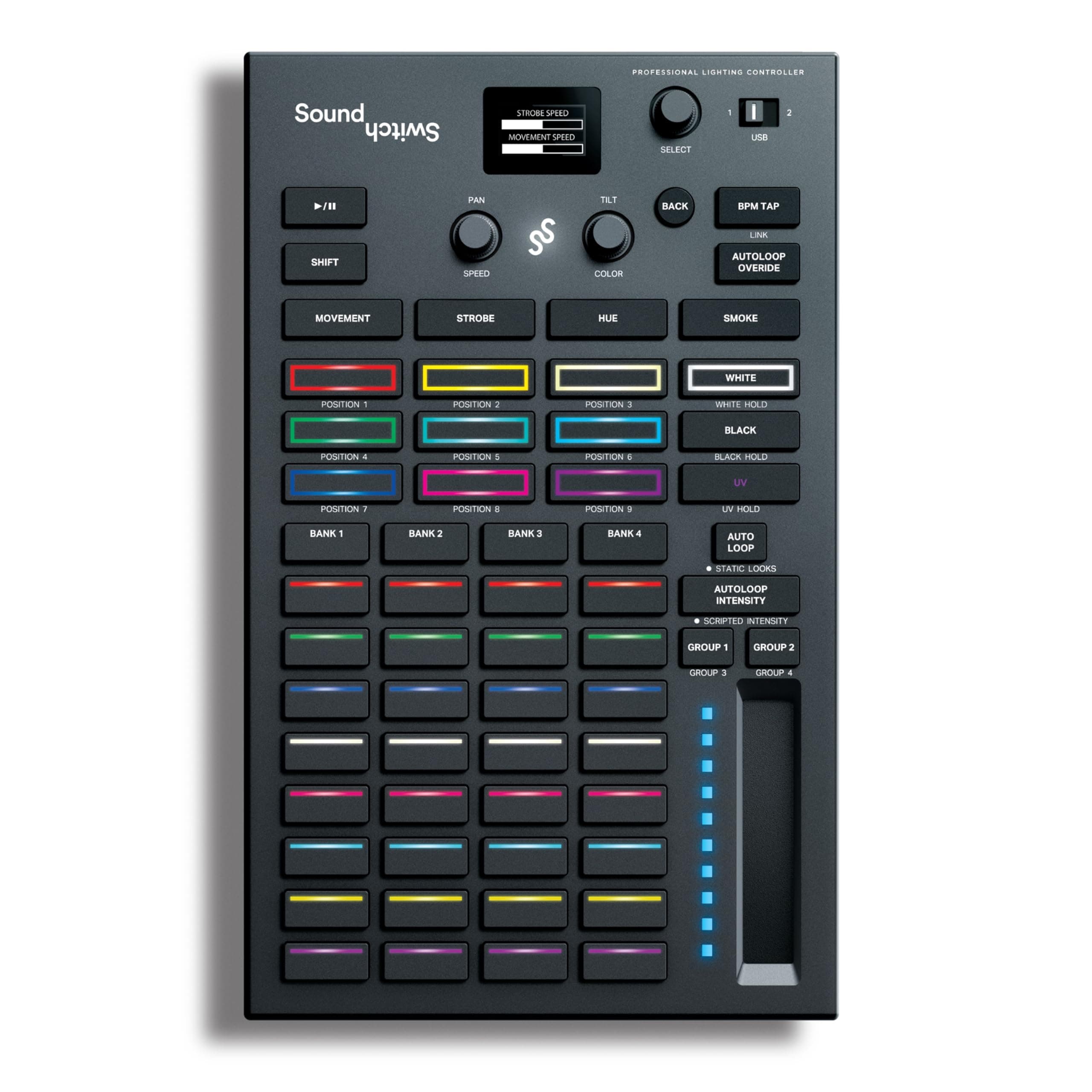
🎉 Light up your set like a pro—control, sync, and stun every crowd!
The SoundSwitch Control One is a professional DMX lighting controller designed for DJs and lighting pros, offering 1:1 control with SoundSwitch software, dual DMX universes, and seamless integration with Denon DJ and Numark hardware. It includes a 3-month SoundSwitch subscription for automated, dynamic light shows synced to any music source via live BPM detection. Compact and intuitive, it supports Philips Hue smart lights and features customizable RGB pads and encoders for precise lighting effects, making it the ultimate tool to elevate live performances and events.


| ASIN | B09LQSCKG6 |
| Best Sellers Rank | #3,061 in Musical Instruments ( See Top 100 in Musical Instruments ) #15 in Stage Lighting Accessories #3,292 in Music Recording Equipment |
| Customer Reviews | 4.2 4.2 out of 5 stars (1,395) |
| Date First Available | November 24, 2021 |
| Item Weight | 1.76 pounds |
| Item model number | Control One |
| Product Dimensions | 10.68 x 6.6 x 2.16 inches |
A**R
JUST AS ADVERTISED & MORE
LOVE THIS, STILL LEARNING BUT IT WORKS GREAT
J**R
Great For Mobile DJs
Provides excellent lighting controls for mobile DJs without learning a ton of DMX programming.
S**E
DMX lighting made easy
This is the smartest thing SoundSwitch could have done. Making an affordable dongle to introduce such a remarkable software for DMX. Previously they had sold this software with a i/o box and listed for $499. I skipped right past it at that price. The star here is the software it is really all I need. Let me explain as an experienced event DJ, I use movers, wash & other effects lights. Ive always wanted more control for my light show. Especially during event formalities. *There is nothing worse then a perfect picture or happy birthday ruined by flashing red or blue dots. This software is so innovative it stops all lights when music stops. Unlike putting a gigbar or any light in sound mode that still flashes when people clap or sing. This software takes all my lights and creates an amazing show not just flashing to beats but static looks running patterns and random. Oh and with full control over all of that at a click! of the mouse. This software is compatable for tons of namebrand an off brand lighting. The dongle it self is so simple to use just plug USB into laptop, NOTE: best thing is you can run DJ software and SoundSwitch software on same laptop no interferences. You can connect dongle to a long DMX cable or a wireless transmitter (donnor). The more time consuming stuff happens in software. By selecting your lights and matching channels. Nothing too hard to worry over. Ok about software yup its 7.99us a month. Which i prefer for now, i dont dj every month so just unsubscribe for a month or two. Eventually I will buy lifetime subscription.
L**S
Horribly inconsistent
If I could give SoundSwitch a 0/5 overall, I would. The concept is incredible, but the execution and finicky-ness of the software makes it a nightmare. I've spent hundreds of hours creating scripted tracks for songs, but WITHOUT FAIL, SoundSwitch NEVER full pulls through on any live performance. Whether it refuses to connect with Serato, or only one USB microDMX port activates, or it just decides that it doesn't want to use half of the scripted tracks and play some horrible autoloops halfway through the show - it is never a consistent experience. I've spent thousands (literally) of dollars upgrading my lighting rig to adapt SoundSwitch in the hopes of providing an immensely more interactive and entertaining experience for my clients - and it was not worth it. In no professional wedding situation do I have time to restart a program half a dozen times, reboot a computer, plug and unplug again and again until a program "kind of" behaves the way I need it too. You can read the manual, contact the company, look at the walk throughs - the thousands of documents they have - and you still won't get the consistency that you need for anything remotely professional. I will change this review if SoundSwitch will contact me and completely straighten out these bugs and inconsistencies. Until then: DO NOT BUY THESE PRODUCTS
D**Z
didnt like that you have to pay for subscription
The SoundSwitch Micro DMX Interface is a solid entry-level tool for DJs and small lighting setups, but it comes with a few trade-offs worth considering. On the plus side, the ultra-compact design is a big win. It’s lightweight, easy to carry, and doesn’t take up much space in a DJ bag or laptop setup. Setup is fairly straightforward, especially if you’re already in the SoundSwitch ecosystem. The included 3-month software access is a nice bonus and gives you enough time to really test out automated light shows, beat grids, and integration with DJ software like Serato or VirtualDJ. When everything is dialed in, the automation features can make your light show look polished without needing a dedicated lighting tech. That said, it’s not without limitations. The Micro version feels a bit stripped down compared to larger interfaces—most notably, it only outputs a single DMX universe, which can be restrictive if you’re running a more complex lighting rig. Build quality is decent but leans toward the “basic” side, and the USB connection can feel a bit fragile if you’re constantly plugging and unplugging it at gigs. Also, the SoundSwitch software, while powerful, has a learning curve, especially for beginners who aren’t familiar with DMX programming. Overall, the SoundSwitch Micro DMX Interface is a good choice for mobile DJs or small venues looking to step up their lighting game without a huge investment. Just be aware that if your setup grows, you might outgrow this interface fairly quickly.
H**N
A great way to get into DJ lighting
I got this to try out DJ lighting using SoundSwitch, as a less-expensive point of entry than buying the Control One. It's been great for my purposes so far. The device itself has been flawless -- my computer sees it and it sends DMX signals without issues. Of course, this is also part of a software ecosystem (via SoundSwitch -- I haven't actually tested whether it works with other DMX software). Overall I think SoundSwitch does a great job at creating interesting light shows that run automatically (i.e. without needing a person controlling the lights or a dedicated light board). It takes a bit of work to get each new type of fixture set up, especially for more complex fixtures that have motion or built-in pre-programmed functions. Once you have your fixtures set up, the built-in automation for creating track-specific light shows is great. There is definitely a learning curve to it, and unfortunately the online resources, while helpful, aren't super-easy to find and aren't collected in a single location. I've found YouTube videos and the SoundSwitch facebook group to be the best sources of information, enough that in a couple of weeks' free time I was able to get everything working that I wanted to.
S**O
Va genial en denon, uso muy intuitivo y facil, una vez empiezas le coges el truco, va con licencia te dan 3 meses, lo que dejas grabado se queda aún que borres la licencia.
E**C
J'aimerai bien avoir un support technique pour la première mise en route...ceci dit, bon produit.
G**C
My 2nd soundswitch as I lost my original - had to get another as just amazing! This comes with 3 months subscription to the soundswitch computer software that allows you to add your DMX lights - unless you are going to be adding lights frequently or are running big venues where your lights are changing frequently, this is enough. I've used the software to add 5 DMX lights for my DJing hobby and have let my subscription lapse - should I need to add any more lights in the future it's very simple to re-subscribe at a very reasonable monthly fee. HOWEVER, for me the fact that this USB to DMX cable can "talk" to my Denon deck running Engine Prime software is a complete game-changer - plug this into the USB A port of the deck, connect the DMX output to one of your lights and you now have complete control of any DMX light that is connected. The SoundSwitch software can also automate lights and following the recent update (2.8) it has become even better.
J**.
Trying to figure out how to use it, but will get there.
L**O
Mettetevi comodi perché con sto coso ce ne sta da parlare... avoglia!!! Allora, prima di tutto... che cavolo è? A cosa serve? che ci faccio? come funziona?. Bene! cercherò di rispondere a tutte queste domande. Il SoundSwitch DMX Micro Interface è, come dice il nome, un cavo che funge da interfaccia Compatta USB-DMX per il controllo delle luci da discoteca. Il protocollo DMX è appunto uno dei modi che si utilizzano per configurare i giochi di luce in maniera fantastica e professionale. Quindi primo "TIP" è: se non hai luci da programmare e/o non vuoi perdere tempo a configurare giochi di luci su faresti da discoteca, questo prodotto non ti serve. Se invece potrebbe interessarti sappi che: il modo più fantastico di utilizzo è con le console con a bordo il software di gestione "Engine DJ" (attualmente le console stand-alone DENON e NUMARK), che ha integrata anche una gestione professionale delle luci che potresti "pilotare" proprio con questo cavetto. Altra possibilità è usarlo comunque con altri controller DMX anche su pc (Windows o Mac). Per la gestione/configurazione dei giochi di luce E' NECESSARIO utilizzare il software Soundswitch, liberamente scaricabile dal sito del produttore ma che necessita OBBLIGATORIAMENTE di abbonamento per poterlo utilizzare; acquistando questo cavo avete tre mesi gratuiti di utilizzo per poter capire se facia il caso vostro e se vi piace... dopodiché € 7,99 al mese e passa la paura... attenzione... niente abbonamento niente divertimento (non potete utilizzarlo, se non i set che avete già approntato); quindi secondo TIP: se pensate di non pagare ogni mese l'abbonamento, utilizzate i tre mesi gratuiti per configurare tutti i giochi di luci e le periferiche, ma tenete a mente che senza un abbonamento attivo non potrete fare alcuna modifica. Come funziona? Il software Soundswitch è fatto molto bene (anche se parecchio complicato per chi è alle prime armi); prima di tutto occorre individuare ed associare tutte le periferiche in vostro possesso relative ai "giochi di luce" (faretti, laser, strobo, luci multifunzione, macchine del fumo etc. etc.) Il database è infinito e, comunque, permette di segnalare la periferica ove non fosse presente. Ora... non voglio addentrarmi nel panorama DMX altrimenti mi dilungherei troppo, ma l'importante è sapere che ogni periferica dotata di protocollo DMX ha un determinato numero di canali... bene! una volta individuata nel database la periferica in vostro possesso, occorre assegnarli il numero di "posti" a seconda del numero dei canali che essa dispone (sicuramente è più facile a farlo che a spiegarlo). Una volta che avete terminato l'assegnazione dei canali di tutte le vostre luci, potete scegliere i vari programmi (gli scenari); questa operazione può essere fatta manualmente o con programmi predefiniti. Si può assegnare ad ogni singolo brano lo scenario preferito o, se si vuole, anche alla cartella o al DJ SET. Alla fine vi posso assicurare che il risultato è eccezionale; avrete dei giochi di luce da veri professionisti. Ora la domanda è: ne vale la pena? se siete dei professionisti che durante i loro DJ SET utilizzano proprie luci, ASSOLUTAMENTE SI! la differenza che c'è tra i giochi di luce impostati con questa interfaccia e quelli della classica modalità sound è la stessa che c'è a guidare una 500 Abarth ed una Ferrari. IL risultato è veramente fantastico; andatevi a vedere su YouTube il sito di SOundswitc per capire cosa sto dicendo. AL contrario: sei un professionista che lavora nei club dove la gestione delle luci non è di tua competenza? Beh ne puoi fare assolutamente a meno. Sei una persona che ha due faretti di numero e una strobo? Anche qui magari ti prepari i giochi di luce con i tre mesi di abbonamento gratuito poi quando devi aggiornare i brani puoi ogni tanti pagarti la mensilità (l'abbonamento si disdice a riattiva come si vuole). CONCLUSIONI Lo spettacolo di luci che potete fare con questo corsetto è fantastico quanto difficile da spiegare. Ripeto che lascerete tutti a bocca aperta; se poi siete possessori di console DENON o NUMARK tutto quanto sarà ancora più facilmente ed immediatamente gestibile. CONTRO serve un abbonamento e configurare i giochi di luce in maniera "seria" non è cosa da poco... occorre una buona dose di pazienza e perderci parecchio tempo. Consigliato solo a chi ha necessità di gestire personalmente i giochi di luce o chi, come me, vuole divertirsi anche con le luci mentre mixa.
Trustpilot
Hace 2 meses
Hace 5 días