We remain fully operational. Our teams are working around the clock to ensure your deliveries continue safely.

Descargar la aplicación


Servicios al cliente
Sobre nosotros
Copyright © 2025 Desertcart Holdings Limited
Descargar la aplicación
Unleash Your Productivity! 🚀
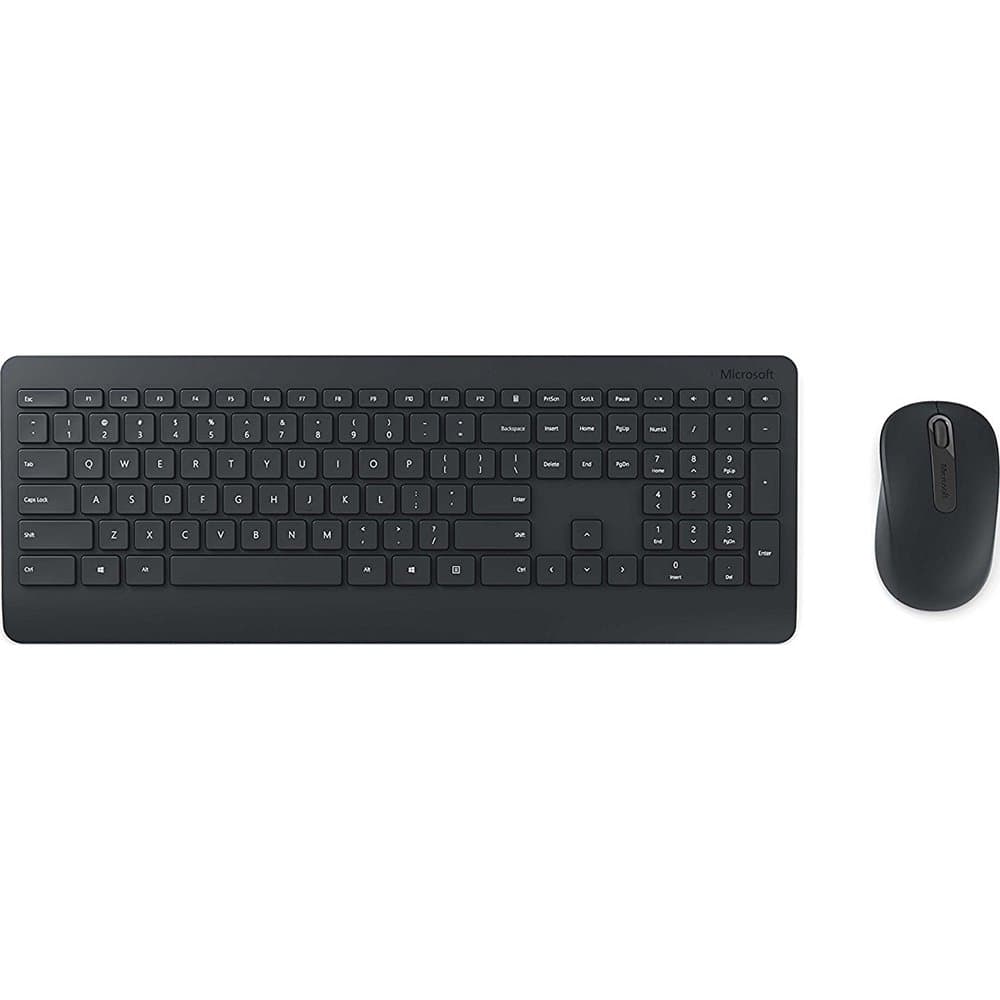
The Microsoft Wireless Desktop 900 is a sleek and efficient keyboard and mouse combo designed for both PC and Mac users. With a lightweight design, ergonomic features, and reliable wireless connectivity, it enhances your workspace while ensuring comfort and convenience.
| ASIN | B014W20BFA |
| Antenna Location | Security |
| Are Batteries Required | Yes |
| Brand | Microsoft |
| Built-In Media | Keyboard and mouse set - wireless, Software, USB wireless receiver |
| Color | Black |
| Compatible Devices | PC, Mac |
| Connectivity Technology | Usb |
| Customer Reviews | 4.3 4.3 out of 5 stars (2,208) |
| Global Trade Identification Number | 00889842002669 |
| Hand Orientation | Ambidextrous |
| Item Type Name | Microsoft Wireless Desktop 900 - Keyboard & mouse set - English - North America, Black (PT3-00001) |
| Item Weight | 2.05 Pounds |
| Keyboard Description | Full-size keyboard with silent touch keys and wireless connection that is powered by 4 AA and AAA batteries. |
| Keyboard Layout | QWERTY |
| Manufacturer | Microsoft |
| Movement Detection | Optical |
| Number of Batteries | 4 AA batteries required. (included) |
| Number of Keys | 104 |
| Operating System | Windows |
| Other Special Features of the Product | Wireless |
| Power Source | Battery Powered |
| UPC | 889842002669 |
M**Y
This wireless combo let's me sit on my couch and control my laptop while it's plugged into my HDTV. I love it.
B**Y
I purchased this Microsoft 900 wireless keyboard and mouse about a week ago and have been using it my office in place of a Logitech wired K120. I had two reasons for purchasing this: 1) I bought the mouse separately a few months ago and really like it, but it has a glossy finish so I wanted to try the matte finish version that comes with the keyboard and 2) wanted to try a different keyboard for home use than my Microsoft Sculpt Bluetooth keyboard-which works really well, but pairing to my main computer and back to my tablet is getting old. First off, I really like the matte finish on both the mouse and the keyboard, feels great. There’s no fingerprinting/smudging, so that’s nice. Not a huge deal on the other mouse, but it did bother me a little. Also, the glossy finish made my palm feel a little clammy until I got used to it. This mouse is essentially the exact same as the glossy version with the exception of the finish. It’s solid, pretty quiet, fairly lightweight (with ability to run on one battery, if you prefer a lighter mouse), has typical Microsoft high quality left/right click buttons and a light press center wheel button. Most mice have a stiff center wheel button and that can really matter if you use it all day. It does only have 3 buttons, no forward/back, so if that’s what you’re looking for, this may not be for you. The keyboard really surprised me. I don’t typically like the chiclet style keys on laptops, but after trying a Surface Pro 4 keyboard out at Staples, I decided maybe I can get used to one. The keys on this are well spaced and were easy for me to adjust to. The big surprise to me was the sound it makes, WAY less. This is a nice change from typical keyboards because I tend to pound out emails and probably sound like I’m typing angry! The buttons have just the right amount of travel, in my opinion, a little less travel than standard keyboards have. There’s no indicator light for numbers lock or caps lock, not a big deal for me. I look at the screen while I type, so it’s obvious if either is turned off and that’s quickly corrected! There are five dedicated buttons and they worked fine with the standard Windows 7 driver: calculator, play/pause, mute, volume down and volume up. There’s also a right-click button by the windows button. I suppose that might come in handy if you’re trying not to use your mouse or just don’t want to. I didn’t download the keyboard center as everything was working with the basic driver and I don’t care much for overcomplicating and unnecessary programs that may fail or get screwed up with a system update. The keys aren’t backlit, doesn’t matter to me as I don’t type in the dark. My only complaint on the keyboard is the function buttons are a little short, again not a big deal as I don’t use them that much. Overall, this is a very nice keyboard/mouse combination that really compliments my workspace well. It frees me from some wires and looks/sounds/feels premium. I intend to get a second set to keep in my office permanently. It’ll be interesting to see if the batteries last much over a year, Microsoft says they’re supposed to last up to two years.
S**R
Un teclado completo pero a la vez compacto, con teclas que parecen más las de una MacBook que las típicas teclas concavas y huecas de otros teclados, planas, ni muy grandes ni muy pequeñas. Con una sensación de que se escribe en algo de calidad y probablemetne duradero. El Mouse, es demasiado simple para lo bien logrado del teclado, pero presiento que me iré acostumbrando. Actualización, Definitivamente estoy muy cómodo con el teclado pero hay dos detalles, que no me terminaron de gustar, no hay botón de encendido / apagado. Para evitar clics accidentales mientras se hace limpieza hay que tener cuidado extra o de plano remover las baterías. Segundo, la tecla de Caps Lock no tienen ningún indicador, por lo que cada vez que tengo que ingresar una contraseña tengo que revisar escribiendo en algún otro lado para saber en que modo está. Vamos Microsoft no podías poner ni un pequeño foquito? Actualización 2: Si existe un software de MSFT para el indicador de CAPS. https://go.microsoft.com/fwlink/?linkid=849754
ع**ف
100 مية حاجة نضيفة مرة انصح بية
I**N
I use this everyday and would totally recommend it. I bought it based on price.
Trustpilot
Hace 1 semana
Hace 1 semana