We remain fully operational. Our teams are working around the clock to ensure your deliveries continue safely.

Descargar la aplicación


Servicios al cliente
Sobre nosotros
Copyright © 2025 Desertcart Holdings Limited
Descargar la aplicación

Buy anything from 5,000+ international stores. One checkout price. No surprise fees. Join 2M+ shoppers on Desertcart.
Desertcart purchases this item on your behalf and handles shipping, customs, and support to Peru.
🚀 Elevate your network game with pro-grade speed, security, and control!
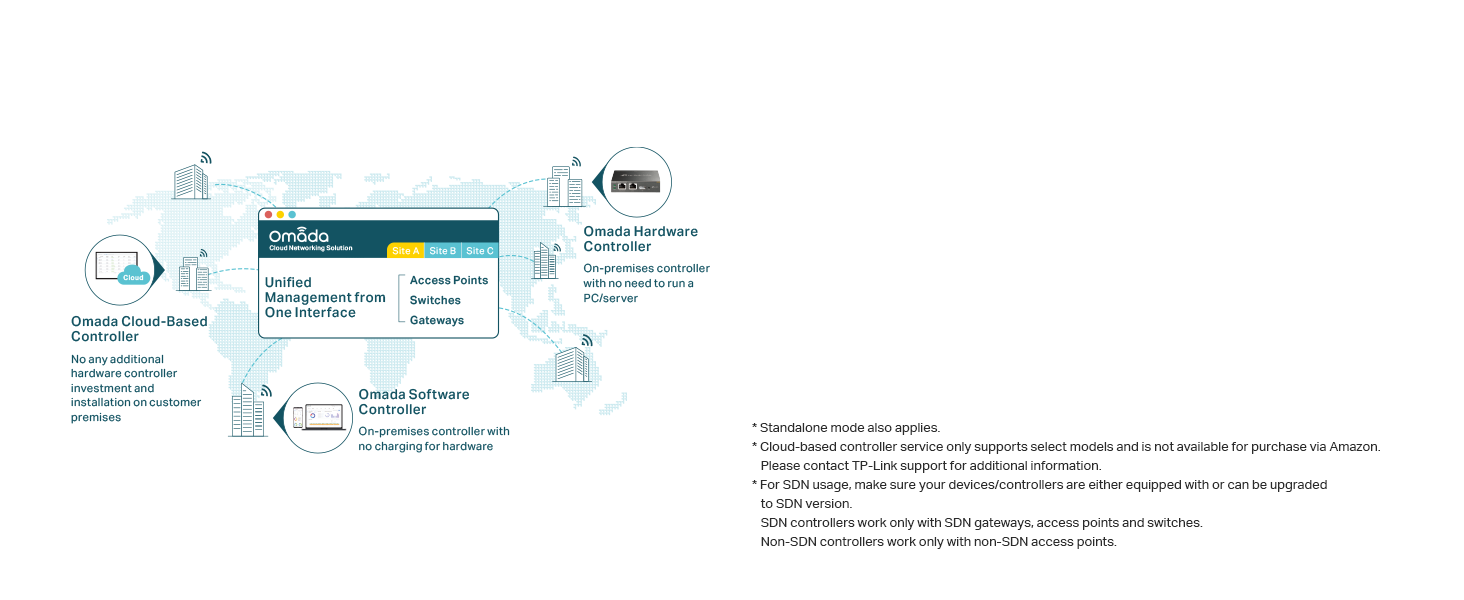
The TP-Link ER7206 is a high-performance multi-WAN gigabit VPN router designed for professional environments. Featuring 4 flexible WAN/LAN ports, it supports up to 150,000 connected devices and 700 clients simultaneously. Integrated with Omada SDN, it offers centralized cloud management and advanced security protocols, including support for over 250 VPN connections. Built for reliability and scalability, it’s ideal for modern offices and demanding home networks.




| ASIN | B08TQN7NMG |
| Antenna Location | Business |
| Antenna Type | Internal |
| Best Sellers Rank | #2,457 in Electronics ( See Top 100 in Electronics ) #22 in Computer Routers |
| Brand | TP-Link |
| Built-In Media | ER7206, Power Cord, Quick Installation Guide |
| Color | Black |
| Compatible Devices | Personal Computer |
| Connectivity Protocol | Ethernet |
| Connectivity Technology | Ethernet |
| Control Method | Remote |
| Controller Type | App Control |
| Coverage | Up to 150,000 devices |
| Customer Reviews | 4.4 4.4 out of 5 stars (601) |
| Data Transfer Rate | 1 Gigabits Per Second |
| Frequency Band Class | Dual-Band |
| Global Trade Identification Number | 00840030701474 |
| Is Modem Compatible | No |
| Item Dimensions L x W x H | 8.9"L x 5.16"W x 1.38"H |
| Item Type Name | Router, Bridge, Wireless Access Point, Switch, Modem |
| Item Weight | 2.01 Pounds |
| LAN Port Bandwidth | 10/100/1000 Mbps |
| Manufacturer | TP-Link |
| Manufacturer Contact Information | Richmond Hill, ON L4B 1J5, CA |
| Maximum Upstream Data Transfer Rate | 4000 Megabits Per Second |
| Mfr Part Number | ER7206 |
| Model Name | ER7206 |
| Model Number | ER7206 |
| Number of Ports | 4 |
| Operating System | Linux |
| Other Special Features of the Product | Internet Security |
| RAM Memory Installed | 512 MB |
| Security Protocol | WPA2-PSK, WPA-PSK, WPA2-Enterprise, WPA-Enterprise, WPS, WEP, WPA3 |
| UPC | 840030701474 840460604642 |
| Unit Count | 1.0 Count |
| Voltage | 110 Volts |
| Warranty Description | 5 Year Manufacturer |
| Wi-Fi Generation | Wi-Fi 5 |
| Wireless Compability | 802.11ac |
J**S
Great product and excellent tech support
I purchased this product, hardware version 1.6, more than 2 years ago, and it has been performing perfectly since then without any issues. The product has a good look of design as usual in a rectangular shape that is constructed proportionally so-called Golden Ratio - visually appealing. It supplies a web platform for administrators to manage networks via a very clean visual design of the user interface as well - actionable items or tasks are categorized and arranged very clearly for the administrators quickly locating the tasks to perform such as monitoring the runtime issues or solve specific problems in configurations. I use this product constructing my home network that is pre-wired in Cat. 6 Ethernet in every room, and VLAN segmenting Wi-Fi network from the wired network, my home office, children, and guest accesses. Technically, my review only pertains to the features of WAN/LAN, not VPN yet. This product provides what I need and performs well as expected without any issues. I haven't had chances to try out the other features such as VPN as mentioned before, including Omada SDN Integrated Load Balancer but the load balancing in software configuration will be my next plan to implement. I am definitely confident in its functionality. Also, the manufacture's tech support is very responsive in communications and the solution provided to solve the issue of the firmware update is efficient and quick. Overall, great product and the customer services, two-thumbs up!
M**R
Working non-stop for 18 months.
Bought mine on June 2024. Year and a half later no problems at all. The room is air conditioned and the router is supplied by an UPS. Working non stop. Excellent piece of equipment.
V**S
Well designed piece of equipment
I'm replacing an out of support Sonicwall with the TP-Link. No real complaints about the Sonicwall other than the cost of the replacement and yearly maintenance being a bit more than I want to spend at this point. Did some research and settled on the TP-Link ER7206. The cost of which is less than a year of Sonicwall support. History dictates one sets aside some time to set something like this up so I blocked out a day and started in the morning. Much to my amazement I was done with the basic setup and had internet connectivity in about 20 minutes. There were more settings to be tweaked of course but that was a really pleasant surprise. Setting up DHCP and assigning static addresses took about another 20 minutes. VPN was a bit more complicated. If I was going to pick one nit with the TP-Link it's that the online help did not always reflect exactly what was in the UI. But that is a minor complaint. The TP-Link ER7206 has been running without issue since the initial setup. I unreservedly recommend this device.
K**N
Outstanding Value for a well designed Wired (not WiFi) VPN Router
This offers much better VPN speeds (throughput) than the TP-LInk TL-ER605 so if someone is considering buying that model, they should consider this instead for a few dollars more it is much faster with more memory and processing power. Although considered a business product it is well suited for the home. I see many "VPN routers" advertised which actually only support VPN connectivity for connecting into the network where the router resides ONLY as a VPN SERVER - for people to connect to it from the outside through a VPN tunnel - NOT for their router to connect as CLIENT to a VPN tunnel where the other end is a VPN server (for example connecting to an office remotely FROM this router, or connecting directly to an external VPN server for internet access through a VPN service provider). This router does both. For people using a VPN provider for security this is a good option especially as it is smarter to split the WiFi and VPN processing work across two devices so as to minimize the processing load on any one piece of networking equipment. However, at this time, it does not yet support acting as VPN CLIENT to connect to a VPN provider or external VPN server using the OpenVPN standard (that is coming shortly through a firmware update as this is a new product). Note, although the support staff is very responsive in a timely manner, they sometimes do not correctly answer complicated technical questions - for example saying something cannot be done when I have found a way to make it work. Until a recent firmware update which was available a few days ago, this unit would run very hot although it does not anymore after the update. Also this router does not support WOL (Wake On Lan) but for what can be considered a business class Wired VPN Router, that is typically not a requirement. The interface takes a little getting used to, although it does work quite well. This is a quality product, they only reason why I did not give it 5 stars is because of the tech support item mentioned earlier. However, if you have this router you should strongly consider getting the TP-Link Controller (model OC200 (home) or the newer OC300 (business)) - please see my review for the OC300 which I also own.
M**F
Many types of errors are appearing
P**N
Good unit. I have managed to set up a VPN after trial an error. There is not enough tutorial and support information to configure the system. Poor menu system. Really should be USB power supply by now.
V**A
very bad experience i had with tp-link omada and er7206 vpn router...totally waste of money. i would like to send it back to the supplier but i dont know i could get refund or no? can the supplier let us know about the refund.
H**9
Facile da installare e configurare
J**O
So far this router has performed without any issue. The only downside is There does not be way to get notifications of updates that I can see. There does not seem to be a way to set up a scheduled reboot at least in the basic config I do not use the Omada controller there be a way there after setting this up later on with the OC 200 cloud controller. Many options were opened up that were not available in standalone one of them being the Bility to set up automatic updates by month week etc. so far after using the system for many months it works great no issues, I have the cloud controller the VPN router and a TP Link switch. I have not got the access point yet I’m waiting for the new ones to come out all in all I say this is a great system for someone who wants to set up a home net work .
Trustpilot
Hace 1 mes
Hace 3 semanas