We remain fully operational. Our teams are working around the clock to ensure your deliveries continue safely.

Descargar la aplicación


Servicios al cliente
Sobre nosotros
Copyright © 2025 Desertcart Holdings Limited
Descargar la aplicación
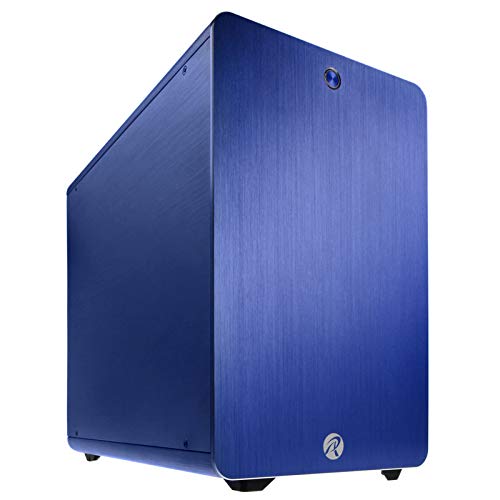
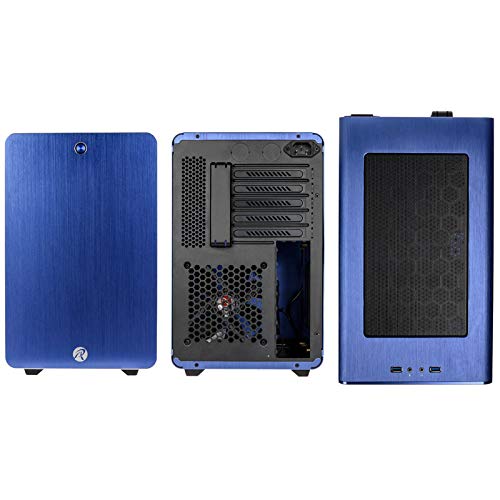
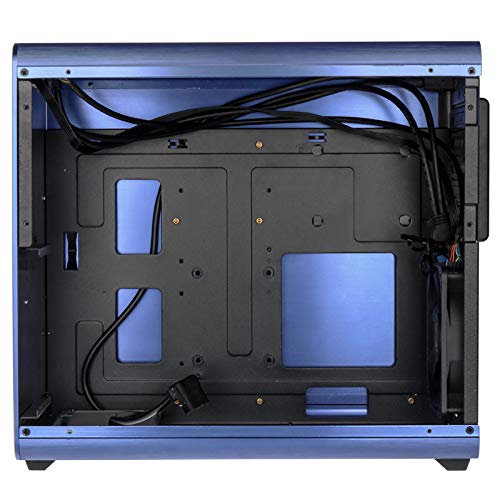

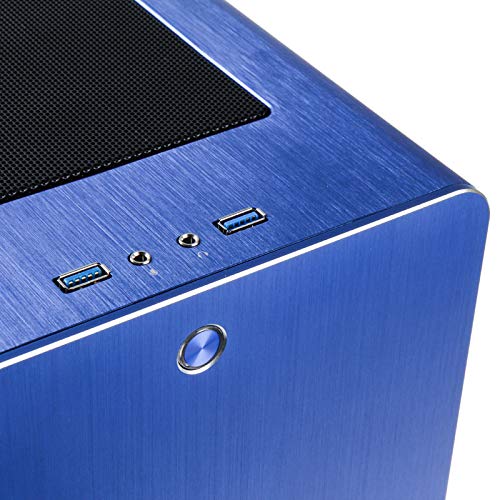


Product Description How'd you like to build a powerful, customizable computer, without emptying your wallet in the process? It's easy. Just make sure you start with the astonishingly affordable. They boast plenty of features usually reserved for more expensive cases. Like an ultra quiet 350 Watt Smart Power power supply. Eight drive bays. Plus a chassis air guide and a low speed 120mm fan. The result? A powerful, expandable, and genuinely personal computer. So pick up yours today! Set Contains: 1 case
S**_
Great looking Case but could be better in ease of building!!!!
Case was good but a few flaws wasn't the easiest case to build. It has a few WTF design issues, like the removable drive bracket I tried to use this but there's no room for the SATA cable or power cable after you fix it down I tried 3 different ways but none of them worked. The back for cable management has zero room as the 24 pin pushes on the back panel. what can say though was the finished PC looked really nice. Delivery was earlier than described and was packaged really well
A**.
Great case Raijintek Styx
I own this case for about 1 week.Here's some brief info, as per Raijintek page and my inputs as well:Max. 280mm VGA card (or shorter, depending on the PSU length)Supports up to max. 180mm height CPU coolerOn top of the case, 2×USB3.0 ports, audio + mic (HD audio)Anti-vibration rubbers for HDDs installationSupports 3×3.5"HDD + 2×2.5"HDD / 1×3.5"HDD +4×2.5"HDD - this is valid only under certain conditions, see more below120 mm performing fan pre-installed at rear (3pin, good and silent so far)Option to install 240mm radiator on the top/side and 120mm fan at bottomDimension [W×D×H] - 210×360×335 mmHere's my build:Asus x99-m ws + 5820k + noctua d15s (huge double tower, single fan)Corsair LPX 32gb 2400 (low profile RAM)Corsair RM850i (180mm length, modular). Don't even think to fit non modular PSU in this case :)EVGA GTX 550 TI (210mm length +20-30mm added due to power cable)2 SSD's + 1 x 3.5 HDD3 additional 120mm fans (so 4 in total)First of all, the case has an excellent build! Nothing to complain here, the quality of materials and finish is excellent!It has a top mesh that filters the air. Unfortunately this mesh is not removable from outside, you have to open the case and push 2 hooks to pop it open. It's not a frequent activity, only when building/replacing fans (very rare) or in need to clean the filter (yearly?).Secondly, it's a bit crammed inside to work with, so you have to plan your build carefully. It offers plenty of space but if you build in the wrong order, or if you forget to add something, the Styx case is not forgetful so you have to remove some components to fit others, then fit them all back :)It has the motherboard screws pre-mounted for matx (not sure if all matx cases are like this), but this gives you good starting point.There is enough room in the SATA area (side) for sata + power cables. And there is "just enough" room (10-11mm) to pass also the ATX power from my PSU (sleeved, rounded, which is about 11mm thick). This "just enough" means that depending on your cables, so you might have to wrap & tie that long and thick ATX cable in the main chamber :(Case allows 240mm AIO rad on top (it's the only reasonable place to fit it with access to fresh air - the horizontal panel is also an option but would not have access to fresh air - because no vents on the side panel).Case also allows 120mm AIO rad at the back if removing the default fan (or on top, of course).The region on top of the PSU is the only place to keep the tied cables, so work carefully not to put too much pressure on the front IO pcb plates (2xUSB3.0 + audio&mic jacks).Space on the bottom will allow either 1 HDD or 1 120mm fan. But not both at the same time.An SSD + fan will also be ok, but you will not be able to properly screw the SSD in place (you can use a thin strip of double sided tape, e.g.10x10 mm to secure the SSD somehow, but good luck removing it without mess when you'll need it :)).Also the bottom area might get crammed, depending on the MB layout - because usually the CPU 8pin x 2 are located in that area.A longer PSU (i would say anything longer than 150mm to be on the safe side) means no way you can fit 2 HDDs on the horizontal plate of the case. In my build (180mm long PSU), only the HDD at the back of the plate is available (like in the picture).Would not suggest this case if working with regular size components and expecting to fit all the possible HDD's and fans.For example, a slightly longer GPU (e.g. more than 250mm) will hit a long PSU like in my build. A taller GPU (e.g. usually the atmospheric ones) might hit the HDD on the horizontal plate. So a future GPU upgrade in my setup will be most probably limited to Asus/Gigabyte Mini GTX 970.Anyhow, my advice is to fit all sata and power cables to the areas where SSDs/HDDs are supposed to be located even if you don't have yet the storage. But if you don't do this now at the time of the build, you might have to remove components later, in order to fit & route the cables, etc...The area between front plate and PSU allows a slot-in ODD. It's nice to have the option. But you have to fit it before screwing the PSU in place. In my configuration I didn't install such ODD and also didn't use that space to store the cables. But it's an option to make more room above the PSU, in case no ODD.There is room for extra GPU card, but I personally would not fit a second GPU if there's a top rad installed. It's one or the other, otherwise the AIO will almost touch the GPU card so will not be enough room for top GPU card to pull air.Idle temps: 30C CPU package, 25C MB, 50C GPU, Room temp 20CFull load temps after 10 minutes load (no overclocking): 50C CPU package, 40C MB, 77C GPU, Room temp 20.3CThe case enables silent operations, but of course I cannot measure exactly how good is at keeping the noise in :)My conclusion:I cannot recommend this case for those folks that are constantly building their PC, add/remove components on monthly basis, etc. I would say it's not intended for them :)But I TOTALLY recommend it for those that do such changes rarely (most of the folks i guess?), and want a small and stylish case that is big on the inside for the components to have good air flow.There is no other case like this (e.g. smaller), that would allow tall cpu cooler and big size psu, in this kind of format (e.g. non cube). I'm talking from my quest-for-case experience :)The PROS are:1) Intelligent design for the interior, with plenty of options, but not all at the same time :)2) Very small3) Excellent build quality and aesthetics4) Very good ventilation, regardless of Air or AIO water cooler.Overall, I give it 8/10 for the features, 10/10 for the build quality.What I would change in the Styx, for a perfect 10 (although there are several points, these are minor, and most probably they are the result of the compromises taken when designing such small case).1) Increase the side ssd area by 10mm width, and remove from the main chamber width. Anyhow the tallest CPU towers are around 165cm so they will still fit. This will allow to place more cables in the side SSD area, and even to double the SSDs (e.g. stack them). Or make the case 10mm wider, just for this purpose... Now it's 21cm wide; 22 cm will still be good :)2) In addition, make the vertical plate (holding the motherboard) with more holes at the bottom, where you might want to pass cables.3) Top mesh - make it removable from outside (read: magnetic?) so that you don't have to open the case.4) Horizontal hdd panel - attach it via some hinges and not via screws, for easy opening. I saw a Lian Li case where they allowed rad mount to move on hinges, nice touch...5) Have some air vents on the sides, mainly talking about the main chamber side - i know, this is subjective because some will like the solid finish or quietness, but i'm more into utility.6) Protect the top IO circuit and cables inside the case with some small plate, so that the cables from PSU, etc. will not apply pressure on the IO cables and the pcb plates. Route the IO cables on the sides. This is because the place above PSU is crammed with cables (the only place that you can bend and store them)7) Use a shorter USB 3.0 cable (from mb to front IO), or more flexible (if possible). It's very long and stiff and adds more chaos to the limited space.few extra details on the pcpartpicker, search for "micro air rig x99"-a(pictures coming soon)
S**E
Buono con qualche problemino.
Case bi buona fattura e materiali ottimi, dal vivo la sensazione che dà è migliore delle foto.Dimensioni compatte, ma ha molto spazio all'interno per installare un dissipatore grande o un radiatore a doppia ventolaOspita alimentatori standard ATX, anche se consiglio di usare un kit cavi più corti perché in questo spazio ristretto si creano problemi di avvolgimento dei cavi, consiglio come alternativa un SFX-L modulare che ha i cavi corti di default.Quello che non mi è piaciuto sono gli slot da 2,5" sul retro della MB, perché vanno usate 6 viti per disco, dopo di ché non rimane fermo, balla un po'Lo spazio del doppio fondo posteriore è molto strettoCol modello superiore di questo case, il Thetis, hanno risolto questi problemi, aumentando di 1cm lo spessore dello spazio dietro la MB e adottando dei gommini per installare i dischi da 2,5" (oltre alle differenza della MB ATX al posto della MATX)Il flusso d'aria per il raffreddamento non è ottimale anche se non ho avuto problemi da questo punto di vista, ma una griglia frontale, magari fatta con un criterio estetico vista la posizione, sarebbe stata di aiuto.
C**S
Caja muy interesante para montar una placa micro-ATX
La caja cumple con las espectativas en cuanto al montaje de los conponentes, refrigerador de CPU de 159 mm de alto, fuente de alimentación de tamaño normal, 1 disco SSD y tres discos de 3.5 pulgadas.Ojo con el montaje de los componentes, como te equivoques y no pongas algo en su sitio, te arriesgas a tener que desmontar media caja para montar lo que habías olvidado.Como punto negativo, la calidad no está a la altura del precio que pagas, pero si necesitas una caja con éstas medidas, es lo que hay.
N**Z
Sehr gutes Gehäuse
Das Aussehen des Gehäuses ist einfach super! Das Gehäuse bietet trotz des Formfaktors ausreichend Platz, seine Hardware unter zu bringen (auch wenn das Fummelarbeit bedeutet :D). Ich würde jedem Gamer ein möglichst kleines/kurzes Netzteil empfehlen damit längere Grafikkarten reinpassen außerdem sollte man sich noch Lüfter dazu kaufen da es in dem kleinen Gehäuse doch recht heiß wird (nach langem ausprobieren hat sich herausgestellt das 2x Oben rein + unten und hinten raus als beste Lösung anbietet).Wichtig: Das Styx Classic ist nicht rot wie man denken könnte sondern ne Art Bordeauxrot bis Pink
Trustpilot
Hace 1 semana
Hace 1 mes