We remain fully operational. Our teams are working around the clock to ensure your deliveries continue safely.

Descargar la aplicación


Servicios al cliente
Sobre nosotros
Copyright © 2025 Desertcart Holdings Limited
Descargar la aplicación


🚀 Elevate your network game with silent power and smart control!
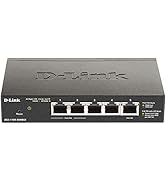
The D-Link DGS-1100-24PV2 is a 24-port Gigabit smart managed switch featuring 12 PoE+ ports delivering up to 30W each and a total 100W power budget. Designed for SMBs, it supports advanced traffic management including VLANs and QoS, offers cable diagnostics and loopback detection, and operates silently with a fanless design. NDAA compliant and backed by a lifetime warranty, it provides flexible desktop or rackmount installation for reliable, high-performance networking.




| ASIN | B0876F5J4G |
| Best Sellers Rank | #189 in Computer Networking Switches |
| Case Material | Metal |
| Current Rating | 0.01 Amps |
| Customer Reviews | 4.3 4.3 out of 5 stars (478) |
| Data Transfer Rate | 48 Gigabits Per Second |
| Date First Available | April 16, 2020 |
| Global Trade Identification Number | 00790069451782 |
| Interface Type | RJ45 |
| Is Discontinued By Manufacturer | No |
| Item Dimensions LxWxH | 11.02 x 9.05 x 1.75 inches |
| Item Weight | 4.55 pounds |
| Item model number | DGS-1100-24PV2 |
| Language | English |
| Lower Temperature Rating | 23 Degrees Fahrenheit |
| Manufacturer | D-Link Systems, Inc. |
| Product Dimensions | 11.02"L x 9.05"W x 1.75"H |
| UPC | 790069451782 |
| Upper Temperature Rating | 122 Degrees Fahrenheit |
| Voltage | 110 Volts (AC) |
S**O
Works well
One thing to be careful of is that the mask is set to /24 by default, and I could not talk to it until I matched my desktop machine to that, meaning I needed to take it off DCHP, set up as static, configure the D-Link switch and then put everything back. The other way to configure it is using the D-Link phone app (why no windows app?). It was useless. It can (apparently) configure the switch, but all I got was strange "received data does not match sent" errors. Anyways, I replaced a TP-Link 24 port switch that was unmanaged with this unit. A $130 managed 24 bit switch is hard to beat, and I see that 10g is not really going anywhere (who needs that?). I don't really NEED a managed switch, but why not? Now I can talk to the switch, block out ports, whatever. Just don't expect deep packet inspection and Bob's your uncle. I haven't tried the SNMP apps, but expect to be using that capability as well. It probably runs quite cool as well, I haven't tested it because the Linksys box sitting on top of it can cook eggs. Finally, it was actually slightly smaller than the TP-Link it replaced. In general I have found the 24port stuffs works for me. I used to have a tree of switches, but having everything come back to a central box makes sense to me. That way, the switch is the only limit to speed. I have a moderately busy house for internet, and I have 17 of the 24 ports filled, so I would say this is the correct size for me.
M**.
Perfect.
Works great. Easy to setup and administer.
H**R
D-Link 5 Port POE Switch is much more than just a Network Switch
I have worked electronic security for several decades, from legacy technology up and through the vast realms of technological breakthrough in various avenue of electronics. Installed over 500 Axis IP cameras, access control and on and on. However, given the limits of Network technology regarding distance, I have a customer that wanted cameras where no power was to be, almost 700 feet from his home in a vast yard. We installed buried CAT5e 14 years ago, in the yard to a tree. Now with items such as Veracity Longspan, POE and network activity can easily be accomplished at 700ft+, and with that delivery, items such as this Switch, are totally powered by POE, into and distributed by this D-Link switch. The POE powers this switch via Port 5, and then Port 1 and 2 can be managed to deliver that POE budget to a Wireless Access Point locally, Wireless Arlo camera communicates to this access point, and a POE splitter, powered by Port 2, provides 5vdc to keep the Arlo cameras powered continuously 700ft away. One CAT5e, delivers 54 Volts of POE and 10/100 Network function 700ft away, (Network Max typically 100 meters/ 324 ft) with NO other electrical source. Without this switch, it would not work, or be manageable via PC remotely. I have 4 of these, as they are basically priceless. If you know what you are doing, your only limited by personal limitation. Veracity, D-Link, Trend-net AP's, are amazing. Very happy customer that can keep an eye on his house and yard from Halfway around the world... 5 star indeed.
A**R
Works, but setup isn't for the faint of heart.
In the end, I got three of these set up with multiple VLANs, but setup can be tricky. When you click "Apply" on a settings page, the changes are applied, but not saved. So if a change disconnects you from the unit (say, when you change the management IP from its default to your own), then you have to be able to reconnect to the device using the new settings. Otherwise, you're locked out with no chance to reconnect. When you reboot, your settings are lost. I suppose that could be a good thing, but you just have to plan your steps and don't plan to do more than one step at a time. I just found myself spending a lot of time changing the IP settings on my laptop just to get these over the finish line.
M**O
Super Simple & Not Super Expensive
At first I was questioning going away from Netgear when looking at network switches, but after receiving this one and just plugging it in I am very happy. I This was the first time I was going to use a switch as I had recently ran Ethernet throughout my house to get the best connection on major appliances, so I was not familiar with switches but after some research I decided a managed switch was what I wanted. The price of the Netgear managed switches with 6 ports minimum were pretty high and I did not really want to get another brand as all my network system is the same. I took a chance and boy am I happy with the outcome. It was plug & play and all my devices quicker when that are all in use. Great product for that mid to high grade category I think.
K**K
pretty lame
this is for DGS-1100-05PD first off switch does not ship with DHCP enabled, and all are set to the same static address of 10.90.90.90 to access you need to set your computer to manual IP address or 10.90.90.9, mask 255.255.255.0 and gateway 10.90.90.1 then in your browser goto 10.90.90.90 login to switch with password admin goto system ipv4 and set to DHCP, do not power off the switch set your computer back to DHCP find the switches IP address using ip scanner or look in your routers DHCP lease table log back into the switch at its new address, then click save config at top left of web page, click apply, you can now power cycle switch and it will stay set to dhcp the POE pass through functions are also limited and don't play well with cisco switchs or work at all with POE injectors so my advise is avoid this switch, much better options are available
M**D
Muy buena calidad y compacto
J**.
good price easy setup need to buy a second cable if you don't have 20 extras like me :)
Good price easy setup does it work? Who knows. Could use a second cable though.
R**S
I wanted a small 5-port managed switch initially to monitor network traffic by mirroring the traffic to a monitoring port, and later for use with an OpenBSD-powered Raspberry Pi WireGuard client gateway (see attached pic). The latter uses VLANs to effectively add one or more Ethernet ports to the Raspberry Pi and is easier much higher performance in my experience than using USB Ethernet adaptors. I found WireGuard throughput was limited to 100Mbit/s with an Ethernet adaptor but this rose to 200Mbit/s using VLANs and the D-Link switch. It could be even higher but my Internet connection is limited to 220Mbit/s ! The switch has worked perfectly in both roles and was very easy to set up, the only gotcha being the need to reduce the default bridging VLAN1 to one port only first so as to allow ports to be allocated to the untagged VLANs. I used eth1 as the VLAN trunk link to the RPi, eth2 for the Internet connection and eth3 for the internal network. An added benefit is that the switch is 5V-powered so can be run off a multi-output USB power brick (see attached pic) with the purchase of a separate USB-to-5.5/2.1mm plug (pin +ve) cable.
V**0
Prodotto come da descrizione, mi havpermesso di collegare su un cavo Ethernet PoE, una 1 videocamera PoE, 1 Laptop ed una stampante ad una velocità di 1Gbs.
S**O
Flüsterleise und bisher keine Probleme mit dem D-Link DGS-1100.
J**A
muy bueno
M**.
Works well for small network setups. The switch is compact, easy to install, and performs reliably with gigabit speeds.
Trustpilot
Hace 3 días
Hace 2 semanas