We remain fully operational. Our teams are working around the clock to ensure your deliveries continue safely.

Descargar la aplicación


Servicios al cliente
Sobre nosotros
Copyright © 2025 Desertcart Holdings Limited
Descargar la aplicación

🚀 Boost Your Signal, Own Every Corner of Your Space!
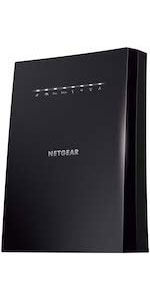
The NETGEAR EX6120 AC1200 WiFi Range Extender dramatically expands your wireless coverage by up to 1,500 sq. ft., supporting over 25 devices simultaneously. Featuring dual-band technology with patented FastLane™, it delivers speeds up to 1.2 Gbps for seamless streaming and gaming. Its compact wall-plug design includes an Ethernet port for wired connections and offers a quick, one-button setup compatible with any router or ISP. Ideal for eliminating dead zones and buffering, it ensures your entire home or office stays connected with secure, reliable WiFi.




| ASIN | B014YN7LVE |
| Best Sellers Rank | #16 in Repeaters |
| Brand | NETGEAR |
| Built-In Media | Quick start guide, WiFi Mesh Extender (EX6120-100NAS) |
| Color | White |
| Compatible Devices | Router |
| Connector Type | RJ45 |
| Customer Reviews | 3.7 out of 5 stars 43,399 Reviews |
| Data Transfer Rate | 1200 Megabits Per Second |
| Frequency Band Class | Dual-Band |
| Frequency Bands Supported | 2.4 GHz, 5 GHz |
| Global Trade Identification Number | 00606449109962 |
| Item Dimensions D x W x H | 1.54"D x 2.17"W x 2.64"H |
| Item Weight | 0.29 Pounds |
| Manufacturer | Netgear |
| Range | feet |
| Special Feature | FastLane Technology |
| Special Features | FastLane Technology |
| UPC | 606449109962 |
| Unit Count | 1.0 Count |
| Warranty Description | 1 year warranty |
| Wireless Communication Standard | 802.11ac |
| Wireless Compability | 802.11ac |
R**H
Easy to Set-up & Connect
After logging into NetGears Setup Page and making a password and 2 security questions I found it fairly simple and quick to get the AC1200 WiFi Range Extender to lock into my router. I live in a mobile home and the WiFi connection in the living room where the router is located is fine but when you take your laptop or Ipad down to the other end of the trailer, in the bedrooms you lose quite a bit. On a lot of sites you would get a lot of buffering. Once I put AC1200 in the back bedroom it was like having the router in the room. Plus there are no cord connections, just plug it in the wall socket. If I want to use an Ethernet Cable with my laptop in the bedroom there is an Ethernet Port on the side of the AC1200 Extender to plug into. Some Extenders I reviewed before buying this one don't have that feature. You can't go wrong with this model. Works great. And if your a member of Amazon Prime you'll get it in 2 days. I did.After logging into NetGears Setup Page and making a password and 2 security questions I found it fairly simple and quick to get the AC1200 WiFi Range Extender to lock into my router. I live in a mobile home and the WiFi connection in the living room where the router is located is fine but when you take your laptop or Ipad down to the other end of the trailer, in the bedrooms you lose quite a bit. On a lot of sites you would get a lot of buffering. Once I put AC1200 in the back bedroom it was like having the router in the room. Plus there are no cord connections, just plug it in the wall socket. If I want to use an Ethernet Cable with my laptop in the bedroom there is an Ethernet Port on the side of the AC1200 Extender to plug into. Some Extenders I reviewed before buying this one don't have that feature. You can't go wrong with this model. Works great. And if your a member of Amazon Prime you'll get it in 2 days. I did.After logging into NetGears Setup Page and making a password and 2 security questions I found it fairly simple and quick to get the AC1200 WiFi Range Extender to lock into my router. I live in a mobile home and the WiFi connection in the living room where the router is located is fine but when you take your laptop or Ipad down to the other end of the trailer, in the bedrooms you lose quite a bit. On a lot of sites you would get a lot of buffering. Once I put AC1200 in the back bedroom it was like having the router in the room. Plus there are no cord connections, just plug it in the wall socket. If I want to use an Ethernet Cable with my laptop in the bedroom there is an Ethernet Port on the side of the AC1200 Extender to plug into. Some Extenders I reviewed before buying this one don't have that feature. You can't go wrong with this model. Works great. And if your a member of Amazon Prime you'll get it in 2 days. I did.After logging into NetGears Setup Page and making a password and 2 security questions I found it fairly simple and quick to get the AC1200 WiFi Range Extender to lock into my router. I live in a mobile home and the WiFi connection in the living room where the router is located is fine but when you take your laptop or Ipad down to the other end of the trailer, in the bedrooms you lose quite a bit. On a lot of sites you would get a lot of buffering. Once I put AC1200 in the back bedroom it was like having the router in the room. Plus there are no cord connections, just plug it in the wall socket. If I want to use an Ethernet Cable with my laptop in the bedroom there is an Ethernet Port on the side of the AC1200 Extender to plug into. Some Extenders I reviewed before buying this one don't have that feature. You can't go wrong with this model. Works great. And if your a member of Amazon Prime you'll get it in 2 days. I did.After logging into NetGears Setup Page and making a password and 2 security questions I found it fairly simple and quick to get the AC1200 WiFi Range Extender to lock into my router. I live in a mobile home and the WiFi connection in the living room where the router is located is fine but when you take your laptop or Ipad down to the other end of the trailer, in the bedrooms you lose quite a bit. On a lot of sites you would get a lot of buffering. Once I put AC1200 in the back bedroom it was like having the router in the room. Plus there are no cord connections, just plug it in the wall socket. If I want to use an Ethernet Cable with my laptop in the bedroom there is an Ethernet Port on the side of the AC1200 Extender to plug into. Some Extenders I reviewed before buying this one don't have that feature. You can't go wrong with this model. Works great. And if your a member of Amazon Prime you'll get it in 2 days. I did.After logging into NetGears Setup Page and making a password and 2 security questions I found it fairly simple and quick to get the AC1200 WiFi Range Extender to lock into my router. I live in a mobile home and the WiFi connection in the living room where the router is located is fine but when you take your laptop or Ipad down to the other end of the trailer, in the bedrooms you lose quite a bit. On a lot of sites you would get a lot of buffering. Once I put AC1200 in the back bedroom it was like having the router in the room. Plus there are no cord connections, just plug it in the wall socket. If I want to use an Ethernet Cable with my laptop in the bedroom there is an Ethernet Port on the side of the AC1200 Extender to plug into. Some Extenders I reviewed before buying this one don't have that feature. You can't go wrong with this model. Works great. And if your a member of Amazon Prime you'll get it in 2 days. I did.After logging into NetGears Setup Page and making a password and 2 security questions I found it fairly simple and quick to get the AC1200 WiFi Range Extender to lock into my router. I live in a mobile home and the WiFi connection in the living room where the router is located is fine but when you take your laptop or Ipad down to the other end of the trailer, in the bedrooms you lose quite a bit. On a lot of sites you would get a lot of buffering. Once I put AC1200 in the back bedroom it was like having the router in the room. Plus there are no cord connections, just plug it in the wall socket. If I want to use an Ethernet Cable with my laptop in the bedroom there is an Ethernet Port on the side of the AC1200 Extender to plug into. Some Extenders I reviewed before buying this one don't have that feature. You can't go wrong with this model. Works great. And if your a member of Amazon Prime you'll get it in 2 days. I did.After logging into NetGears Setup Page and making a password and 2 security questions I found it fairly simple and quick to get the AC1200 WiFi Range Extender to lock into my router. I live in a mobile home and the WiFi connection in the living room where the router is located is fine but when you take your laptop or Ipad down to the other end of the trailer, in the bedrooms you lose quite a bit. On a lot of sites you would get a lot of buffering. Once I put AC1200 in the back bedroom it was like having the router in the room. Plus there are no cord connections, just plug it in the wall socket. If I want to use an Ethernet Cable with my laptop in the bedroom there is an Ethernet Port on the side of the AC1200 Extender to plug into. Some Extenders I reviewed before buying this one don't have that feature. You can't go wrong with this model. Works great. And if your a member of Amazon Prime you'll get it in 2 days. I did.After logging into NetGears Setup Page and making a password and 2 security questions I found it fairly simple and quick to get the AC1200 WiFi Range Extender to lock into my router. I live in a mobile home and the WiFi connection in the living room where the router is located is fine but when you take your laptop or Ipad down to the other end of the trailer, in the bedrooms you lose quite a bit. On a lot of sites you would get a lot of buffering. Once I put AC1200 in the back bedroom it was like having the router in the room. Plus there are no cord connections, just plug it in the wall socket. If I want to use an Ethernet Cable with my laptop in the bedroom there is an Ethernet Port on the side of the AC1200 Extender to plug into. Some Extenders I reviewed before buying this one don't have that feature. You can't go wrong with this model. Works great. And if your a member of Amazon Prime you'll get it in 2 days. I did.After logging into NetGears Setup Page and making a password and 2 security questions I found it fairly simple and quick to get the AC1200 WiFi Range Extender to lock into my router. I live in a mobile home and the WiFi connection in the living room where the router is located is fine but when you take your laptop or Ipad down to the other end of the trailer, in the bedrooms you lose quite a bit. On a lot of sites you would get a lot of buffering. Once I put AC1200 in the back bedroom it was like having the router in the room. Plus there are no cord connections, just plug it in the wall socket. If I want to use an Ethernet Cable with my laptop in the bedroom there is an Ethernet Port on the side of the AC1200 Extender to plug into. Some Extenders I reviewed before buying this one don't have that feature. You can't go wrong with this model. Works great. And if your a member of Amazon Prime you'll get it in 2 days. I did.After logging into NetGears Setup Page and making a password and 2 security questions I found it fairly simple and quick to get the AC1200 WiFi Range Extender to lock into my router. I live in a mobile home and the WiFi connection in the living room where the router is located is fine but when you take your laptop or Ipad down to the other end of the trailer, in the bedrooms you lose quite a bit. On a lot of sites you would get a lot of buffering. Once I put AC1200 in the back bedroom it was like having the router in the room. Plus there are no cord connections, just plug it in the wall socket. If I want to use an Ethernet Cable with my laptop in the bedroom there is an Ethernet Port on the side of the AC1200 Extender to plug into. Some Extenders I reviewed before buying this one don't have that feature. You can't go wrong with this model. Works great. And if your a member of Amazon Prime you'll get it in 2 days. I did.After logging into NetGears Setup Page and making a password and 2 security questions I found it fairly simple and quick to get the AC1200 WiFi Range Extender to lock into my router. I live in a mobile home and the WiFi connection in the living room where the router is located is fine but when you take your laptop or Ipad down to the other end of the trailer, in the bedrooms you lose quite a bit. On a lot of sites you would get a lot of buffering. Once I put AC1200 in the back bedroom it was like having the router in the room. Plus there are no cord connections, just plug it in the wall socket. If I want to use an Ethernet Cable with my laptop in the bedroom there is an Ethernet Port on the side of the AC1200 Extender to plug into. Some Extenders I reviewed before buying this one don't have that feature. You can't go wrong with this model. Works great. And if your a member of Amazon Prime you'll get it in 2 days. I did.After logging into NetGears Setup Page and making a password and 2 security questions I found it fairly simple and quick to get the AC1200 WiFi Range Extender to lock into my router. I live in a mobile home and the WiFi connection in the living room where the router is located is fine but when you take your laptop or Ipad down to the other end of the trailer, in the bedrooms you lose quite a bit. On a lot of sites you would get a lot of buffering. Once I put AC1200 in the back bedroom it was like having the router in the room. Plus there are no cord connections, just plug it in the wall socket. If I want to use an Ethernet Cable with my laptop in the bedroom there is an Ethernet Port on the side of the AC1200 Extender to plug into. Some Extenders I reviewed before buying this one don't have that feature. You can't go wrong with this model. Works great. And if your a member of Amazon Prime you'll get it in 2 days. I did.
K**N
The only "extender" worth having really.
Most "extenders" or "repeaters" work in a single band (e.g. 2.4GHz or 5GHz) and have a single radio front end that means they "extend" or "repeat" on the very same RF channel as your primary router. The end result is that you cripple the original router as the repeater interferes on the very same frequency. In theory an extender could have two radio front ends say on the 2.4 GHz band and thus chose a different 2.4 GHz channel to setup its extended network and avoid interference, but as far as I'm aware few if any do that. This extender is dual band, operating on both 2.4GHz and 5GHz and by default will extend both bands. Trouble is that results in the same interference problem as described above - it will setup its two networks on the very same channels as the primary router and thus interfere on both bands! The secret sauce here is that the EX6120 has a unique mode in which it can connect to your main router in one band (e.g. 5 GHz) and then extend that on the other band (e.g. 2.4 GHz). Since these are separate RF front ends the extended network can choose any channel it wants on the extended band. The downside of course is that you only get the bandwidth of the lowest band, but you should never being using an extender for high bandwidth connections in the first place. The benefit is that without the interference you can get the full bandwidth of the channel, unlike typical same-channel extenders that at the very maximum might get half the channel bandwidth. Other benefits of this extender, not necessarily unique to it, are that it uses the upstream main router DHCP for all connected devices and thus your extended network lives on the same subnet as the main router and can communicate with all devices on the main router as well. This is accomplished by creating a virtual MAC address on the main network for each client on the extended network and these virtual address are assigned in a deterministic way (the upper bytes of the MAC are replaced with a fixed prefix) and so you can even properly assign static DHCP addresses for devices on the extended network. This is in contrast to some extenders which instead setup an entirely separate subnet with their own DHCP server which complicates communication between the main and extended networks. Like all of these devices the web administration page could be a bit better and it often tries to "help" you with ham-fisted "wizards" for setup that hide a bunch of useful features. But that's par for the course and it is no worse than most and far better than many.
C**R
Infuriating waste of time
I know it's cheap. But consider the value of your mental health. I wasted 2 days of my life on this nonsense and I learned a lot about just how TERRIBAD a product design can get. Judging by the other reviewers this thing is a challenge for *less* technical users so let me weigh in as a *more* technical user. First. The only way to set this thing up is through their "Night Hawk" app that hooks into the captive portal, yeah like in an airport, not so bad eh? Except no, hear me out here because it escalates the bad little by little so you don't realize what a nightmare you're in until you're 2 days in. See it's not just "watch a 5 second advert", it's (1) create an account just to start the app, (2) grant exact location and local network access because privacy is for criminals and I have nothing to hide, (3) perform a ritualized power cycle timing mating dance to sync with your device's wireless auto connect settings (it helpfully mentions you should probably turn off cellular data, probably the only helpful prompt in the app), and then (4) if you were lucky enough to catch the hotspot in the 10 seconds between appearing and disappearing and you've reached the captive portal dialog, you next have to fill out a fragile multi-page quiz including (I wish I was making this up) unskippable security questions asking for your mother's maiden name and the name of your second cat that you have to type by hand (luckily it accepts keyboard mashing) and when you're finally at the part that MATTERS, aka the actual network info, you can't switch apps to retrieve the passwords for your existing WAP because the second you try, it quits the captive portal and starts you over. But no wait, it gets worse! When I say "starts you over" I mean it exits the config in a state that it can't remember, essentially bricking it until you factory reset the device, because the SSID hard coded into the app (NETGEAR_EXT) has been modified and they apparently failed to design for that slight detail. So, fine, factory reset. Netgear support forum helpfully says press for 10-15 seconds but after trying that and tearing my hair out I figured out it's actually 45-50 seconds minimum. Did I mention the hypersensitive WPS button is right next to the recessed factory reset detent and if you brush it while factory resetting, it puts it in an inaccessible state and you have to factory reset again? On the bright side the app has a totally rad name "Night Hawk" wow like a superhero! and also the color scheme is real purdy and since all useful information is hidden and needs to be deduced through trial and error that probably makes it less intimidating if you've never touched a networking device before and don't actually need to get it working. Maybe I'm spoiled with "ugly" but functional software from Mikrotik, Ubiquiti, TP-Link, and assorted open source stuff but holy cow I am never touching another Netgear product, I wasted 2 days of my life on this nonsense.
J**A
Very affordable bargain to extend your WiFi...at least
NETGEAR WiFi Range Extender EX6120 with AC1200 Dual Band Wireless Signal Booster & Repeater Pros Affordable and handy alternative a $40 total Easy to setup Works as advertised with WiFi Cons Do not exceed wireless devices connected to it Same data speeds as the router that transmits to it The Ethernet port failed in my sample The NETGEAR EX6120 WiFi Extender is a nice and compact piece of communications hardware that can be beneficial in homes or large apartments where the main Router / Gateway has difficulty to reach the farthest corner of your place or you insist to keep your main Router hidden, weakening its signals. Having used an earlier technology NETGEAR router in the past I was counting on an easy and smooth installation experience: I was well pleased about this one. For the newbie, it is as easy as plugging the extender to an AC outlet, pressing the WPS button in your main router and another WPS button on the extender. But, yes: there are some tech heads among us that demand to get “under the hood” of any gadget. Guess what? You can login to the extender via your web browser of choice to tweak things – or just presume that you know how they work. At any rate, both ways of setting it up are user friendly for each kind of audience. And its 2 antennas can be rotated 180 degrees each, just in case you are as obsessive with catching your main router's WiFi signal as I am with Digital TV antennas to get the strongest signal with the most channels. Do you have in a far corner of your home a computer, game console or video disk player that won't connect to your network unless it can connect with an Ethernet cable? No problem! The EX6120bWiFi Extender has one Ethernet port. So, you can have WiFi AND Ethernet in a place 'far, far away' from your main router within your house. I tried it with a desktop PC connected by Ethernet, several WiFi devices and it ran a windows update download, rebooted and then... the Ethernet port stopped working! Tryouts with other PC and cable didn't work: the Ethernet port failed. Now, don't try playing wise guy or wise girl by trying to connect via WiFi more devices that it is recommended to support, specially if you use one of those devices for teleconferencing (“ZOOM, TEAMS, anyone, anyone?”). This device won't make your WiFi network run faster or better if your main router and / or internet provider's service level subscription has limitations (remember the last time your favorite interstate highway suddenly got all lanes jammed and you though that the next exit will take you to your place faster?). So, if you see a “internet connection is unstable” message during teleconferencing with an application like ZOOM, you may need to compromise between dining out weekly each month or paying for an upgrade to your internet service that allows at least 20 MBPS. A WiFi extender won't make the cut. Sometimes, you may convince your significant other to relocate your main router in a better location to broadcast your WiFi or may get a Router upgrade that can actually extend the signal reach out. But, for those of us who can't, the NETGEAR EX6120 is a good alternative with an extensive WiFi reach. All photos (c) 2021 by reviewer.
A**R
Great, for desperate connections
Overall Positives: Okay, I'm not going to lie, this is great for something like a basement connection, or third floor where there's NO connection or basically unusable connection. I'm using this in our guest room as we have a media console in there and its network connection to our normal router was painfully slow. Unable to even watch Netflix. This extender honestly works great for that. Setup: Super easy, but I expected nothing else from a WPS setup. Any device that is WPS should be easy to configure. I haven't been able to get the network configuration page to work, even following the directions. The page says I'm not connected to the extender, but I am, and I have an outward-facing connection, so I'm not sure what that's about. Reliability: Had some issues reconnecting once when we restarted our primary router. Simply unplugging and restarting this extender resolved the issue, but it's still an issue, it should be able to handle that. Its range is honestly ridiculous. I have a connection to the darn thing from 2 floors above it (with it in the basement during my testing, my desktop picked up its connection with full bars.) Speed: This is why I'm writing this review... Everything else has been great, but don't fall for the false advertising on the speeds. We have a ridiculously fast network in our house over 500 mb/s down, which is ridiculous for our area. I only get 50 mb/s down on a good day with this extender. Remember, for a desperate, fast connection, this is amazing. Some people don't even have networks that fast, but they claim 1200 mb/s transfer, and it's nowhere near, and yes, my system and network are capable of testing that. I thought perhaps it was a connection or range issue, so I tested this in three different areas of my house, dramatically different areas. This included different floors, at different ranges and connection quality. It's consistent in it's speed, so that's good, maybe? Overall, this is a decent purchase if you need something small and simple to tuck away in a corner, but if you need something to replace or extend your current network speeds, and want more than 10% of your home network, might want to look elsewhere.
G**S
Great Product, Works as Advertised -- Did have a Problem Setting Up -- UPDATED SETUP INSTRUCTIONS
UPDATED - See New Setup Instructions Below: Overall this extender works as advertised. I was able to extend our router signal to the opposite side of our house with a strong signal (our Fire TV Stick always responds with a "Very Strong" wireless signal). Our wifi Blink Outside Cameras at the opposite of the side of the house also work great. Note: the Extender is picking up signal thru 3 walls. I did have an issue with initial setup -- the app to perform setup (mywifiext.net) could not be found when setting up with my desktop (Windows 10, Chrome, Edge or Firefox). I tried clearing cache several times and never got it working with any of these browsers. So I tried setting up with my iPhone and it worked great. I did a factory reset on the Netgear Extender, turned on Wifi on my iPhone and "Bam" their was the Extender App ready for setup! Very happy with the product and will purchase another soon for another part of our house. ----------------------------------------------------------------------------------------------------------- Purchased an N300 in November 2019 and read the instructions. Much easier setup: New Setup Instructions: Much easier setup (took the time to read the instructions). Per the documentation included with the extenders: Connect with WPS: Plug the WIFI extender into an outlet as close to your modem (router) as possible. Wait for the WIFI extender Power Light to turn Solid Green (takes a few seconds). Press the WPS button on the side panel of the WIFI extender. The WPS LED blinks. Within two minutes, press the WPS button on your modem (router) or access point. When the WIFI extender connects to your network, the WPS LED on the WIFI extender lights solid green and your router Link LED lights. If it doesn’t work, try it again. Unplug the WIFI extender and move it to a location that is about halfway between your router and the area with poor WIFI signal. Plugin the WIFI extender and wait for the Green Power LED and Router LED to light. If the Router LED doesn’t light Amber or Green, plug the WIFI extender into an outlet closer to the router and try again. On your computer or WIFI device, find and connect to the new extended WIFI network. It’s that simple!
G**.
Works for me
Still working perfectly. I used this to extend my WiFi to my garage which has an Eufy cam on the far end of my house. Originally the signal had problems going through 2 cement block walls.
W**W
The initial installation was not very smooth but was not too bad. Auto setup didn't work
I had unsatisfied experience with this product, not only because of its performance, but also because of Netgear's customer service. The initial installation was not very smooth but was not too bad. Auto setup didn't work, so I had to do web-browser setup, extra steps, but was okay. After setup, I moved the extender to 2nd floor, and got very strong signal on my smart TV, very happy! But my thrill only lasted for a day. I started to notice interruption with my router signal, occasionally. But the most frustrating thing was that the extender frequently lost connection to the smart TV, and the "DEVICE" indicator stayed in solid red. I had the turn the power off and back on to reconnect, very frustrating. I called the customer service (by the way, I had to register first, then was given 1-408-638-4327. The area code was California, but the service center was in India). First rep directed me to update the software. It didn't solve the problem. Called again, second rep said, "no, no, you don't need to update software. You need to reset the extender." That didn't solve the problem either. Then she said my extender was too far to the router. I knew it was not the issue since the "ROUTER" indicator stayed solid green. But I followed her instruction anyway. It was not helpful, then she asked me to reset again. Enough was enough!!! I hanged up the phone, and was upset because I felt that my time was wasted and I couldn't get real help from knowledgeable service rep. I decide to return the product. I later did research online, and learned that such issue was fairly common for the wireless Wi-Fi extenders (no matter which brand) because "radio signal is very sensitive to interruptions". I hope this review is helpful for the people who are thinking to buy Wi-Fi extender, especially dual band one. The technology seems not very reliable. I gave a low rating, partially because of the poor customer service. Those reps were poorly trained, not knowledgeable, but over-confident and misleading, wasting customers' time.
Trustpilot
Hace 5 días
Hace 1 día