We remain fully operational. Our teams are working around the clock to ensure your deliveries continue safely.

Descargar la aplicación


Servicios al cliente
Sobre nosotros
Copyright © 2025 Desertcart Holdings Limited
Descargar la aplicación


🚗 Decode your drive: Smart diagnostics, zero guesswork.
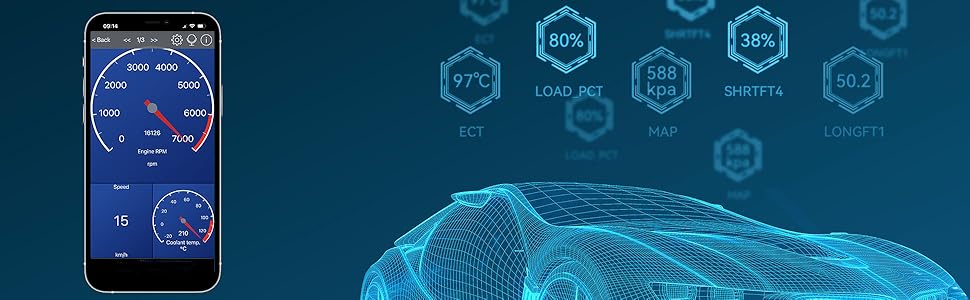
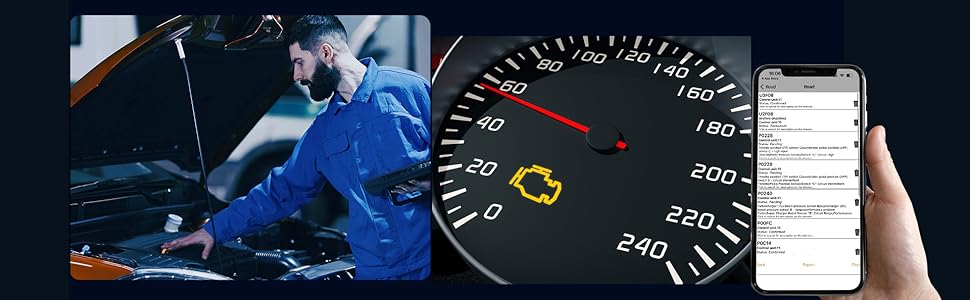
The Veepeak Mini Bluetooth OBD2 Scanner is a compact, Android-exclusive diagnostic tool that wirelessly connects to your vehicle’s OBD-II port. It delivers real-time engine data, trouble code reading and clearing, and customizable live sensor monitoring for most 1996+ OBD-II compliant vehicles. Perfect for proactive drivers who want instant, on-the-go vehicle health insights without the bulk or complexity.


| ASIN | B011NSX27A |
| Automotive Fit Type | Universal Fit |
| Best Sellers Rank | #6,208 in Automotive ( See Top 100 in Automotive ) #42 in Code Readers & Scan Tools |
| Brand | Veepeak |
| Brand Name | Veepeak |
| Customer Reviews | 4.3 out of 5 stars 17,963 Reviews |
| Item Dimensions L x W x H | 1.89"L x 0.98"W x 1.26"H |
| Item Weight | 1.12 ounces |
| Manufacturer | Veepeak |
| Manufacturer Warranty Description | One-Year Hassle-Free Replacement Warranty |
| Operating System | For Android Phones & Tablets (NOT for iOS) |
| Power Source | OBD II Port |
| Product Dimensions | 1.89"L x 0.98"W x 1.26"H |
A**H
Works great, fast updates, quality hardware
I've been using this on a 2000 Buick Park Avenue. I use "Torque Pro" on Android and bought all the paid features to go along with it because it works so well. I tried "Torque Lite" first, which was free. Great app, imo. My phone is a Galaxy S10+ (Snapdragon 855 8 core/8GB RAM/UFS 2.1 storage @ 6gbps/Bluetooth 5.0). I am not sure what version of Bluetooth this device uses. I am assuming 4.0 from the info I'm able to find. The hardware seems to be moderately powerful because I can load my screen up with gauges and have zero slowdowns.. ever. No jamming, no lost connections. I've seriously yet to have an issue with this product or the software I'm using with it. I assume the data transfer rate of BT5.0 or higher isn't necessary. I can log .csv files and open them with any app that can read them (like Chrome, for example). But it can log and show live data without any hitches. I'd recommend it to a friend. It's mentioned everywhere, but just realize you need Android, you need Bluetooth and you need SOME kind of compatible software on your Android device that can utilize this scanner. As mentioned, I am using Torque Pro. You can change how fast some items update vs others, but a lot of mine are updating at least twice a second (I can go faster or slower) and like I said, even with a page full of data being updated, there's no slowdowns. It doesn't get hot. It constantly and smoothly updates, whew, for example, MPH (You can use GPS or OBDII speed, in this instance, I'm using OBDII and a screen to show the difference in OBDII speed vs GPS), RPM, Vacuum, Intake Temp, Load %, Throttle %, EVAP usage and more. I can't even remember what all I have on one screen. You can add formulas (you can find them online) and see if they will work for your car, too. They are for the Torque app. I can reset my codes without issue. I have a massive vacuum leak. Being a 2000 Park Avenue with the 3800 II @ 120kish miles, I'm fairly certain it's the LIM gasket. It's some head/intake gasket that blows on them all between cyl. 4 and 5, because I've had misfires there. So I got it to just mainly keep an eye on my one code that keeps popping up (IAC can't control the high idle) and ended up being able to see so much more. I really love this tool. I use it EVERY time I drive haha. I love looking down and seeing MAF cfm flow, intake temp, Volumetric Efficiency (terrible with the vacuum leak) and more. Just so many little things I didn't expect to be able to see and all updating perfectly like clockwork. So, yeah, some of this praise is to the software, but the hardware, itself, is flawless at sending data all through Bluetooth, somehow, with zero slowdowns. I'm impressed.
T**B
Great pocket sized device.
Works great and pairs easily with android phone. Works great with Car Scanner app. Should work with apps requiring a ELM327 OBD2 bluetooth interface. Good little device for the $
T**J
Excellent value and long lasting (5 years for me).
Worked well for about 5 years. I left it plugged into my car and used it often as a data reader for AT Temp etc. while towing. It finally stopped connecting to my phone via bluetooth. I bought it in 2021, so I've had it almost 5 years. Going to buy another one for $15. Worth it! I'll probably opt to not leave it plugged in all the time, next time around. It could have also broken when my truck died recently and I had to jump start it. I'm not positive what killed it really. I ended up paying for Car Scanner Pro ($5 I think) and I used it for diagnosing issues on anything from my 01 Buick Park Ave to my dad's 2014 Corolla. Does NOT read TPMS or other body control module items. Just ECU data and codes. Live data readouts from O2, MAF, Throttle, temp sensors etc. Really nice tool to have around.
P**L
Nice Android obd2 sensor.
Pretty nice little scanner tool. Connected to my android device via bluetooth and was able to check and clear engine codes in a variety of vehicles. Very nice to have. Was used in a m35x, toyota tacoma, and a g35x without any issues.
D**G
WORTH IT!!
NICE , CHEAP , RELIABLE OBD2 BLUETOOTH SCANNER TO CONNECT TO YOUR PHONE. WORKS WITH A BUNCH OF DIFFERENT APPS. I USE WITH TOURQE, AND WORKS FLAWLESS WITH THAT.
D**S
Small, Fast, and Super Useful!
The Veepeak Mini Bluetooth OBD II scanner is an excellent little tool to have in your car. It paired instantly with my phone, and within seconds, I was reading live data and diagnosing trouble codes using my favorite OBD app. It’s compact, easy to plug in, and doesn’t get in the way while driving. The connection is stable, and it works exactly as advertised—saving me both time and money by helping me troubleshoot issues before taking my vehicle to the mechanic. If you want a reliable, affordable scanner that just works, this is the one to get. Highly recommended!
J**.
Awesome for diagnostics
Item works very well with torque pro. Easy to set up and I use it at least once a week. Only thing I wish It had was a hook for a lanyard because I keep forgetting them in vehicles. Otherwise I've been using for years without issue.
A**Z
Kinda slow, but worth it
I bought this [with my own money not a free on for a review] hoping I would not have to use my very expensive hand held ones anymore which are cumbersome and you always pretty much have to go to the computer to get the codes and search on the net to see what they mean, possible causes and possible fixes. I bought one on amazon similar to this one that was around $18 and had to buy a couple of apps for my phone [around 10 dollars for the apps] to be able to use it. It was OK but I wanted MORE information. I read amazon reviews and realized this was the Cadillac of them at this time [Jan 2016]. I got it in 2 days with Prime. I plugged it on my 3 vehicles and it gives us a plethora of information. We have since sold our hand held ones on craigslist since this thing works so good and gives you unbelievable amount of information. [I do have a couple of complaints, later in the review.] I have been looking for another used vehicle and this device has saved us thousands $$. Your phone is connected to the internet so it goes out and gets you a lot of extra info right away & also updates the device software if need be. It even gives you information about when was the last time someone ERASED ERROR CODES which is happening across the dealers & private sellers in the 40207 and 33186 zip codes more than you would have thought! [in DAYS:HRS:MINS and also miles]. Don't forget anyone can get a cheap code reader for less than 20 dollars and erase all codes! The serious codes that the vehicle computer reads will come back immediately if erased, others will take a day or 2 -or longer-of driving time to come back in. To late if you bought a vehicle from a private owner and it's in your name already. Its funny to see the face of people when I tell them, these are all the error codes that the vehicle is giving me, the possible causes [yes this thing does tell you that too!] and BTW someone erased the codes 3 days 22 hrs and 3 minutes ago! It will give you all recalls for the make and model has had from day one! You can ask the owner or dealer to make sure those have been addressed or not. Most will claim [dealers and private owners] that no one has erased the error codes. I say to them "well sir or madam, this is what YOUR vehicle computer is telling my device. It pretty much saying that someone came in here with a key and a code reader, plugged it in and erased the codes 3 days 22 hrs and 3 minutes ago!" When they finally fess up [not all of them do] I just ask them what were the codes that were erased [to see if it was something easy like they didn't close the fuel cap correctly or something serious like -which I got on several different vehicles without any lights on the dash-a catalytic converter, an O2 sensor or both, anti lock brake codes, steering angle sensors, low or high voltage power supply, tire pressure warning system codes, airbag malfunctions, etc]. This purchase has saved thousands on repairs on several vehicles I checked and would have bought!. Sellers were asking top dollar for these vehicles because they had “no lights on the dash” and they had done a cleaning detail on the vehicle! I even took a vehicle that I really liked to a dealership and paid for an inspection. They didn't get what I got on the code reader at first [or just didn't plug their code reader] but when I complained to the service manager, they hooked up their reader and got the same stuff [erased codes] and other malfunction codes that were not showing on the dash. BTW this device only tells you that codes were erased, it does not tell ou which ones. They refunded my inspection money because of their embarrassment. That right there paid for this device! I also have run in a couple of situations where the person selling the vehicle has advertised a higher model of the vehicle I was looking at to get more money out of it. These are vehicles in the 7k to 15k range I've been looking at [clean title only]. This has happened with private sellers who either buy the LXE [as an example] letters from ebay or a junk yard [I am guessing] and put the new letters claiming the vehicle is a higher level that it really is. The software on this device reads the vin number goes to the net and gets the EXACT model and make from the vehicle. You should see the face of people when I tell them this is a L model [the lower end one ] and not the LEX one! Some of you would say this is on the tittle, well…. Not always. I have a Honda Odyssey and the title does NOT say which model it is! I think everyone reading this knows there are lots of people who are buying vehicles at auction, cleaning them up and sell them for profit posing as regular owners. A vehicle fax can be $40/vehicle and gets expensive quick if you do several cars. [I like vehicle carfax over other because they give you a lot more information on regular service etc than their competitors]. In my area code and in the MIAMI area -which is were I have been also trying to buy a used vehicle- there are tons of people selling more than 10 vehicles a year [which are required by law to get a dealer license and do not]. When you ask them why is the vehicle not on their name, or why the have 4 vehicles for sale out of their house, or why was the title on the vehicles he/she's selling less than 3 weeks old the come with the story about them getting a better vehicle or sob storries. If you pry hard enough they'll tell you they are "wholesalers" but don't have the required licenses insurance etc and are less than reputable in the disclosure of their vehicles they're selling. Don't get me started on the habitual “private” sellers of salvage but repaired title vehicles! Use this device wisely and save yourself a lot of headaches or negotiate a better price on the used vehicle you are buying and also check your existing vehicles and telling your mechanic exactly what is going on. Be an informed consumer. I have two complaints about the device: 1- When looking this couple of months for a used vehicle in zip code areas 40207 and 33186, I usually start the vehicle with it plugged in, let it read all the codes, vin number etc, while the vehicle is warming up, then I drive the vehicle for about 15 to 20 mins to get more info on what the vehicle is doing while you drive it etc and hope that one of the erased codes pops up again. I have lost connection with my phone and the device several times while driving, where I have to stop and reconnect it and therefore lost all data that was being recorded. I thought it could be my phone connection via the Blue-tooth, so I downloaded the app on my wifes phone and the same thing happens! They are both newer iphone 6 and 6 +. Sellers are not to happy to go around and drive the vehicle again for 20 mins so I can record results again! 2-I have also had the device fall from the ODBII plug several times. This kind of sucks because you have to start the process all over again and lose all the data that was there before. I have checked about 20 vehicles in the last 3 months. I usually email myself the data while the app is running and they show the results from that email to the seller if there is something wrong since I haven't figured out how to save the data in the phone. I have resorted now to getting some blue tape and taping it around the plug and the device when its plugged in. Not something I'm happy about. Hope this helps some of you out there.
Trustpilot
Hace 2 semanas
Hace 3 semanas