We remain fully operational. Our teams are working around the clock to ensure your deliveries continue safely.

Descargar la aplicación


Servicios al cliente
Sobre nosotros
Copyright © 2025 Desertcart Holdings Limited
Descargar la aplicación



Buy anything from 5,000+ international stores. One checkout price. No surprise fees. Join 2M+ shoppers on Desertcart.
Desertcart purchases this item on your behalf and handles shipping, customs, and support to Peru.
🖥️ Elevate Your MacBook Experience!
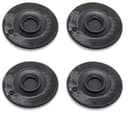
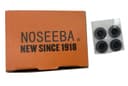
The Flywing AP-0001 Replacement Rubber Feet Kit includes four high-quality rubber feet designed specifically for Apple MacBook Pro models A1278, A1286, and A1297. Weighing only 0.32 ounces and measuring 3 x 2.2 x 0.2 inches, these feet provide a perfect fit, enhancing stability and protecting your device from scratches. Easy to install, they are a must-have for any MacBook Pro owner looking to maintain their device's pristine condition.
| ASIN | B00R4BDL2C |
| Brand | Eforlike |
| Customer Reviews | 4.3 4.3 out of 5 stars (1,116) |
| Date First Available | December 17, 2014 |
| Is Discontinued By Manufacturer | No |
| Item Dimensions LxWxH | 3 x 2.2 x 0.2 inches |
| Item Weight | 0.32 ounces |
| Item model number | AP-0001 |
| Manufacturer | Queenti |
| Product Dimensions | 3 x 2.2 x 0.2 inches |
P**P
Perfect Fit for Older MacBook—Easy, Affordable Fix
I picked up these Flywing replacement rubber feet for my older MacBook Pro (A1278/A1286/A1297) after the original feet came off. These fit my device perfectly, installation was quick and easy, and they attached securely with no hassle. The quality feels solid and they’ve stayed in place since I put them on. For the price, it’s a great value and a simple way to restore stability and functionality to an older laptop. If you’ve got a MacBook with missing or worn-out rubber feet, this is a reliable, affordable solution to get your laptop back in shape. Highly recommended for anyone doing a quick repair on an older MacBook Pro!
R**1
Just like new
They are not "soft and nice". They're firm and nice. Matches the original feet of my MacbookPro. The adhesive is not good enough, so I took forceps and removed the plastic and other gunk from the hole in the bottom of the laptop, test-fitted the replacement foot, and then put a thin bead of silicon sealant in the circular groove and installed the foot, wiggling it to ensure that it went all the way in the little hole. Then wiped the laptop case with a paper towel to remove the excess sealant. Set the laptop on the feet overnight on a hard surface and they are now permanently installed and will never come off. It's nice the company included a set of screws in case any are lost for those silly enough to think that the case needs to be taken apart. The use of silicon sealant is far easier, and far more reliable.
K**N
Better than the originals
I bought these feet for my 2009 Macbook Pro. It's 11 years old now, so it's been around the block. I had lost 2 of the original feet over the years and wanted to replace them. I like these better than the originals, actually! I find that they fit better into the recesses for the feet. The original ones seem slightly too big for the recesses, so I mess with them trying to get them to fit. The new feet fit perfectly and don't budge if I mess with them in the same way. They have a nice rubberized texture, similar to the originals. They seem to be the same height, as I don't experience any kind of wobble when I type. I had to be very careful peeling them off the plastic so I didn't peel off the adhesive too. I haven't had a problem with the adhesion, but my Macbook doesn't get moved around all that much, so they haven't experienced much wear and tear yet.
R**B
Would order again, but would prefer a little more rubbery-ness
My old macbook feet came off too quickly, but they were the real deal. even after being moved around and scuffed on wood, steel, and plastic desk surfaces, They always felt the same. Unfortunately, they were too fragile, like a few other Apple accessories. Fortunately, I found these feet at ana amazing price, and decided I HAD to get them for the sake of my Macbook Pro's metal underside. The upside - They replaced my macbook feet and protect the bottom of my laptop. Downside - once they are worn down a little bit, they feel more like plastic and less like the rubber coating that they used to have on them. Not completely slip resistant anymore. Al in all satisfied with the product, and can't find anything that comes close with the price offered. I did not receive a discount on this item, and am writing an honest and unbiased review for other people.
R**N
Really good
Works perfectly
J**C
Feet Holes Filled, Now Mac Slides
These are made of hard plastic, not rubber. It means they are too smooth and offer no grip. So while they Cover the holes for the missing feet, they now allow the Mac to slide across the table. So one problem solved another one created. Going to use them because I don't ordered several packs, something I now regret. If you need something just to fill in the holes on the bottom of the Mac for missing feet, these would suffice. You'll need to clean any residue from previous adhesives CAREFULLY with a q-tip and. DROP of alcohol on the Q-Tip. Do not try to pour alcohol on the case or near the hole. Doing so will likely get liquid inside the laptop. Then you could greater problems than just missing feet. Let dry. Check that each foot hole is completely clean before putting on the new feet. Align the tiny peg on each foot with the positioning hole in by the foot hole and apply pressure. You may have to use a drop of glue if the feet won't stick. Good luck. if you're looking for real list tick protection from slipping or sliding, go elsewhere.
T**R
Just what you need when you've lost a foot.
Apple laptops are significantly more enjoyable when they have feet, as anyone who's lost a foot can attest. These fit perfectly, and go on easily. Just be sure that you've extracted all the bits of any former, broken feet before placing these. The adhesive is largely unnecessary, as these feet snap into place, but nevertheless helps them feel snug. I'd happily buy them again.
A**S
The best replacements I've found.
I tried another, self-adhesive type before these. The others did not adhere for long -- a month, at best. The others were completely flat on their bottom, ignoring the more complex topography of the foot location on the laptop's bottom plate. On the other hand, these have performed well. I first removed the bottom plate of the MacBook Pro, to be able to remove all traces of the original foot. It had been sheared off, so a remnant remain protruding through a small hole. Removing the laptop's bottom plate allowed the foot remnant to be completely removed. Once having removed the remnant, and after reinstalling the bottom plate, these new feet fit like a glove. Don't waste your money on any alternatives.
Trustpilot
Hace 2 días
Hace 1 semana