We remain fully operational. Our teams are working around the clock to ensure your deliveries continue safely.

Descargar la aplicación


Servicios al cliente
Sobre nosotros
Copyright © 2025 Desertcart Holdings Limited
Descargar la aplicación
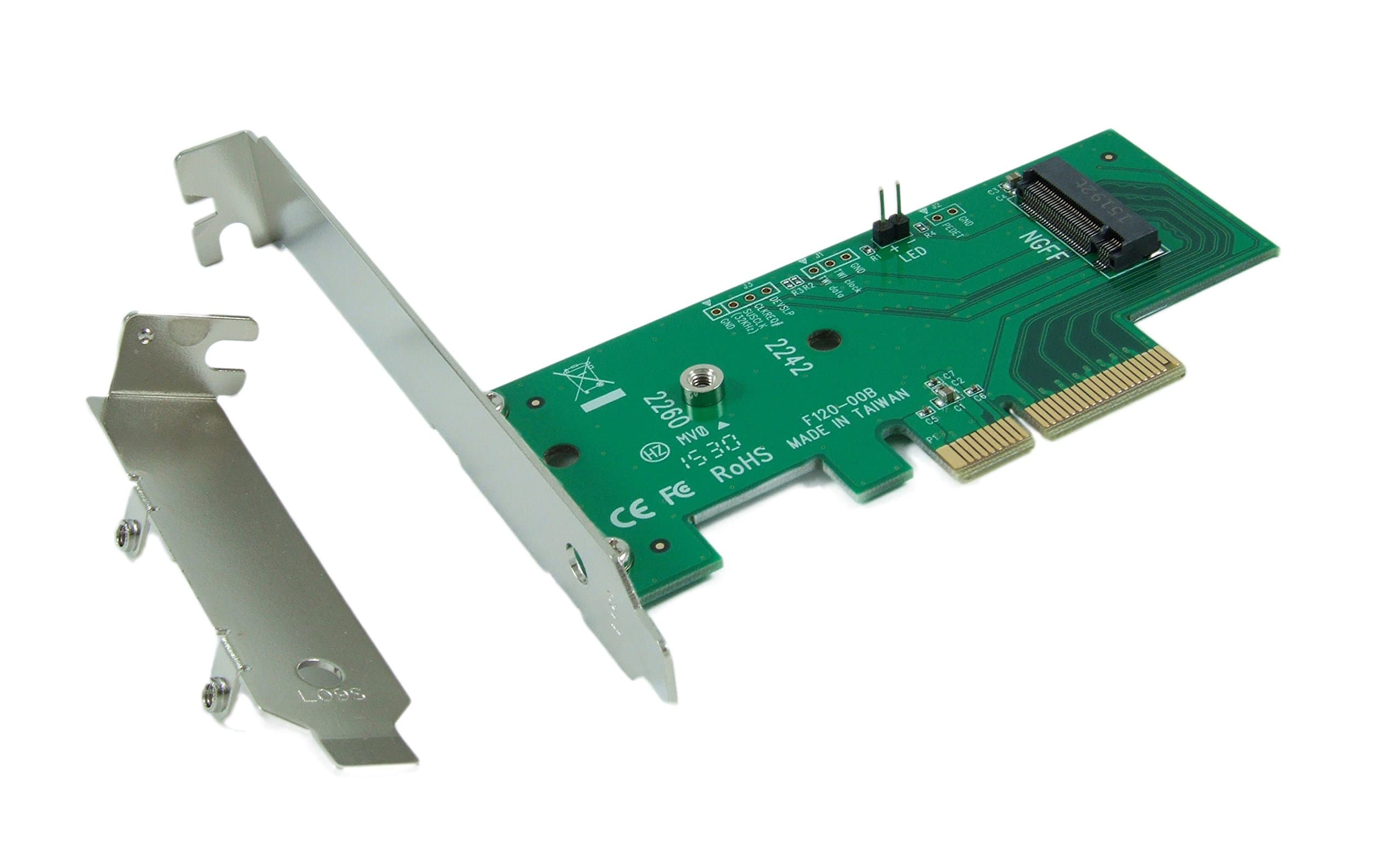
🚀 Upgrade your rig with the DT-120 — where speed meets simplicity!
The Lycom DT-120 is a PCIe 3.0 x4 M.2 NGFF SSD adapter card designed for 'M' key PCIe SSDs, supporting multiple SSD lengths (42mm, 60mm, 80mm) and backward compatible with PCIe Gen1/2/3 motherboards. It features a low-profile form factor, industrial temperature tolerance (-40 to 85°C), and requires no drivers, ensuring effortless installation and broad OS compatibility. Ideal for professionals seeking a reliable, high-speed storage upgrade with hassle-free setup.
| ASIN | B00MYCQP38 |
| Best Sellers Rank | #166 in Computer Memory Card Adapters #318 in Internal Computer Networking Cards |
| Brand | Lycom |
| Compatible Devices | Desktop |
| Customer Reviews | 4.3 4.3 out of 5 stars (361) |
| Hardware Interface | PCI, PCIE x 4 |
| Item Weight | 0.11 Kilograms |
| Manufacturer | LyCOM |
| Model Number | DT-120 |
| Operating System | Linux |
| Style Name | Modern |
| UPC | 616913154107 |
| Unit Count | 1.0 Count |
T**K
Installed Lycom DT-120 PCIe 2.0x4 Adapter + Samsung 950 Pro 512GB PCIe NVMe into new DELL XPS 8900 Special Edition
The installation was easy and flawless! The CrystalDiskMark test results and app performance....priceless (see pictures below)!! This is a real worth while upgrade! Caveats: ------------ -- Made No Changes to DELL BIOS settings! -- Ran CrystalDriveMark benchmarks on full up system (116 background processes and 83GB of drive C: populated with OS and Apps) but with anti-virus and firewall switched: OFF -- Installed Samsung Magician 4.9.5 (it uses 10% unallocated space). The jury is out on this since Rapid disk is not supported for this device. -- Drive C: is UEFI by Acronis partition restore noted below. Instructions and/or recommendations: --------------------------------------------------- 1. Run CrystalDriveMark (free download: http://crystalmark.info/software/CrystalDiskMark/index-e.html) and benchmark the existing drive C:. save the results!! 2. Download the Samsung NVMe Driver first from Samsung site: [...] 3. Make an image backup of current Boot drive (in my case the LITEON M.2 OEM SSD). I used Acronis TI 2016 (all partitions), 4. Shutdown system, unplug and open case (one screw), if you have a non-Boot HDD plugged into SATA-0, move it to another free SATA port (this is just insurance), 5. Assemble NVRe SSD onto the Lycom PCIe 3.0 adapter. Secure with included screw (it fits just fine), 6. Install the PCIe Storage assembly into one of the free PCIe 3.0x4 slot (I used the unused 16-bit slot but you can use the free short slot too), 7. Plug in system and power-up, 8. Press F2 to get into DELL BIOS setup. check the MOBOard slots and make sure Mass Storage device is populating a slot (should be OK) 9. Restart the system. You should get a system notice to GPT initialize the new NVRe SSD, initialize it. 10. Now is a good time to install the Samsung 950 Pro NVRe driver you downloaded previously, 11.Check Disks in the device manager. You should see the new Samsung NVRe device and it should be working, 12. I created the needed partitions on the Samsung NVRe SSD using "Minitool Partition Wizard FREE", they are as follows: Partition #1: FAT32, Size 500MB, No Label (this is the EFI system partition) Partition# 2: NTFS, Size 462GB, Label "OS" Partition# 3: NTFS, Size 450MB, Label "WINRETOOLS" partition# 4: NTFS, Size 12.7GB, Label "Image" !!!! DON'T USE DRIVE LETTERS !!!! Select none for new partition drive letters 13. From within Windows 10 (pro), startup Acronis TI 2016 and perform a full restore from OEM LITEON SSD to Samsung 950 Pro NVRe. I did this from OEM SSD because it had the new Samsung NVRe driver installed after Image backup was performed. 14. When restore is completed, shut down system, unplug system power, ground yourself, open case (if not opened), remove Nvidia Card and power connector, 15: Remove the OEM LITEON SSD by removing m.2 small screw to MOBOard, THIS IS IMPORTANT TO PREVENT BOOT FROM OEM SSD! 16. Reinstall Nvidia card and power connector and bracket, 17. Plug system power back in and power up. The 1st boot will take a little while, 18. If all goes well...you'll be at the Windows 10 logon prompt. 19. Re-install the case cover. Attached images: --My system overview (using speccy) --Before CrystalDiskMark benchmark result --After CrystalDiskInfo result --After CrystalDiskMark Result
B**L
Low price and high quality - product works well and no frustrations with tiny parts (which other brands tend to have)
This card is cheaper than a number of fancier brands out there and is the third one I have used now - the cheapest out of the three I tried and the best one. Mainly because it simply does the job (used it for cloning two Samsung SSDs so far with the Samsung ), and importantly the SSD can be fastened by just using a simple nut to screw it in place onto the card. Several more expensive brands have a whole array of tiny nuts and bolts that nobody with normal hands can handle and achieve anything with (I threw the two other cards I purchased in the trash for this reason). The manufacturers have used common sense and despite the low price tag made a card that is easy to use and works well. So can fully recommend this.
T**G
Works as advertised on m-keyed Samsung PM951
I am so embarrassed by what I did with this thing. I have a bunch of new Dell OptiPlex machines that run Windows 7 and Samsung NVME SSDs, which is a combination that probably shouldn't exist, but it does. The issue is that few conventional imaging tools support NVME drives yet, so... what to do? Answer? Buy a PCIe riser cable and hang this adapter outside a computer and then start loading disk images from within Windows 7. Yeah, you have to power off the machine to swap drives, but that's a lot less hassle than alternatives. No, you don't need a PCIe riser cable, but having this card sitting on the desk is a lot more convenient than constantly installing & removing it from the computer. It works, and works great on all the Samsung PM951 drives I've got. There are no drivers that come with this card and that initially threw me. The tiny little instruction sheet very clearly says to go get the hotfix from Microsoft. You have to give them your email address and they will send you back a link to the "untested hotfix." I've tried this combination on three PCs and all three worked fine, so it seems pretty reliable. Bottom line is this card allowed me to start buying PCs with NVME drives before formally moving to Windows 10 which is a big deal. Very happy with this purchase so far.
F**L
Worked great with a Samsung 950 PRO -Series 512GB PCIe NVMe
This worked great with a Samsung 950 PRO -Series 512GB PCIe NVMe. I'm actually getting the advertised 2500 MB/sec read and 1500 MB/sec speed from the Samsung 950 PRO. Seeing those numbers blew my mind. There are a couple of things to keep in mind if you are going to use a NVMe SSD with this adapter. 1. Make sure you put this in a PCIe 3.0 x4 or higher slot on your motherboard and remember that the number of available lanes in your PCIe 3.0 slots will depend on what is in use in the other PCIe 3.0 slots. If you have a MB that was built to run 3 video cards but are only running 1 or 2, then you should be good to go. Check your motherboard manual to be sure. 2. Windows 10 has NVMe drivers out of the box, but I don't know about older versions of Windows. Do yourself a favor and upgrade to Windows 10 first. 3. If your motherboard isn't seeing the new drive make sure that your PCIe slots are enabled for UEFI. I did this install on a ASUS Z87-Pro and the drive wasn't detected until I switched PCIe Storage from "Legacy" to "UEFI". I'm doing this from memory so the wording may not be exact as to the exact motherboard setting, but it was something like that. 4. Make sure your motherboard is using the latest "non-beta" bios before you install the adapter and SSD.
D**.
Really good device.
Buy this if you need to clone your SSD or M2, also really good if your board doesn't support m2 drives. Pros: - amazing compatibility - good price - it just works, if you have issues may be related to your mainboard. - full speed at 4x pcie Cons: - not the best looking - doesn't come with active cooling (expected at this price point) - only one M.2 connector.
Trustpilot
Hace 1 mes
Hace 3 semanas